
WhatsApp AI CRM: Customer Memory, Promises and Follow-Ups
Turn WhatsApp conversations into customer records, deal stages and a daily follow-up plan. See what AI tracks, what needs review, and how to stay in control.
When customers ask about different products, discuss a price, then disappear for a week, the hard part is remembering where each relationship stands. WhatsApp AI Pro's AI CRM builds customer records from conversations, tracks deal progress and commitments, and brings the people needing attention into a daily briefing. You review its interpretation and decide what happens next.
This is the customer-memory part of our full-workflow WhatsApp AI assistant. The same relationship information supports replies, lead prioritization and follow-ups. You can use it even when you prefer to write customer messages yourself: Watch mode keeps CRM tracking active while you handle replies.
Choosing a CRM? See how WhatsApp AI CRM reduces manual customer tracking, with an inquiry-to-follow-up example.
What the AI CRM records from WhatsApp conversations
| Information | Example from a conversation | How it helps your team |
|---|---|---|
| Customer needs | A buyer asks for 200 packs of replacement filters | Resume the conversation with the relevant product and quantity |
| Concerns and buying signals | The buyer asks about delivery before agreeing to the price | See what still needs an answer; review the AI's intent assessment |
| Deal stage | A price has been shared, but the buyer has not accepted | Keep a quoted deal visible on the board |
| Your commitments | "I'll confirm the delivery cost on Friday" | Surface the due promise and prepare a draft for review |
| Conversation momentum | A previously active buyer has gone quiet | Consider a contextual follow-up instead of searching every chat |
These are illustrative examples, not a customer case study. Records depend on the available conversation; a stage or intent assessment can be wrong and should be corrected.
The distinction matters: your company knowledge holds product facts and policies; your customer record holds what this buyer needs and what has happened in the relationship. A follow-up should use both. Uploading a catalog alone does not tell the AI whether a specific customer has accepted a quote.
Who should I follow up with today?
Start with Today's Plan, the Dashboard's daily briefing, then check due promises and the pipeline board. A quiet conversation, a due commitment and a customer awaiting your decision are different reasons to act. Read the reason and recent messages before sending anything.
Routine follow-ups and promises also have different controls: Suggest mode keeps routine follow-ups as drafts; Auto mode can send them. Promise follow-ups always wait for your approval. Replies quoting a price or delivery time from your spreadsheet wait for your approval. The steps below show that daily routine in Dashboard; labels may vary with your desktop version.
🎬 2-minute demo path — showing this live?
- Open the Dashboard → read today's briefing out loud: "3 things to do today."
- Point at Promises we made — "the AI caught that you told this customer you'd send a quote Friday."
- Scroll to the board: four columns, every card placed automatically.
Step 1 — Start with the briefing: "N things to do today"
The top of the Dashboard is your morning list:
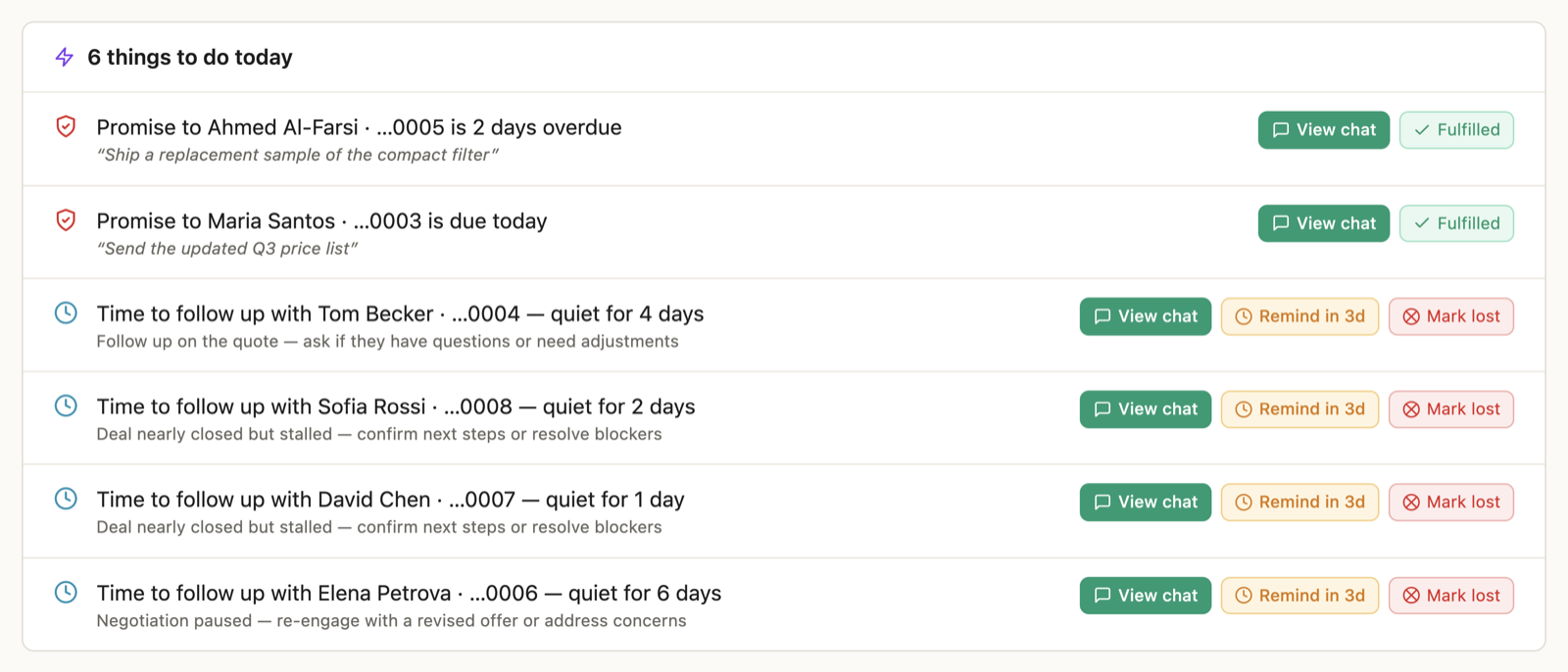
Each line is one customer and one reason, with buttons to act right there:
- "Did Maria's deal close?" → Deal closed / Not yet
- "Carlos will be marked lost in 2 days" → View chat / Mark lost
- "Time to follow up with Ahmed — quiet for 5 days" → View chat / Remind in 3d
- "Promise to Li is due today" → Done / View chat
Handle each line and it disappears. Empty list = "Nothing needs your attention today." The same briefing arrives on your phone every morning if you've turned on auto-forward.
✓ Done when each item has been handled or deliberately deferred.
Step 2 — Check "Promises we made"
The AI examines outbound messages — yours and its own — for commitments such as "I'll send the quote Friday" or "sample ships Monday". Detected promises are collected in the Promises we made card with due dates. Check the wording and date against the conversation:
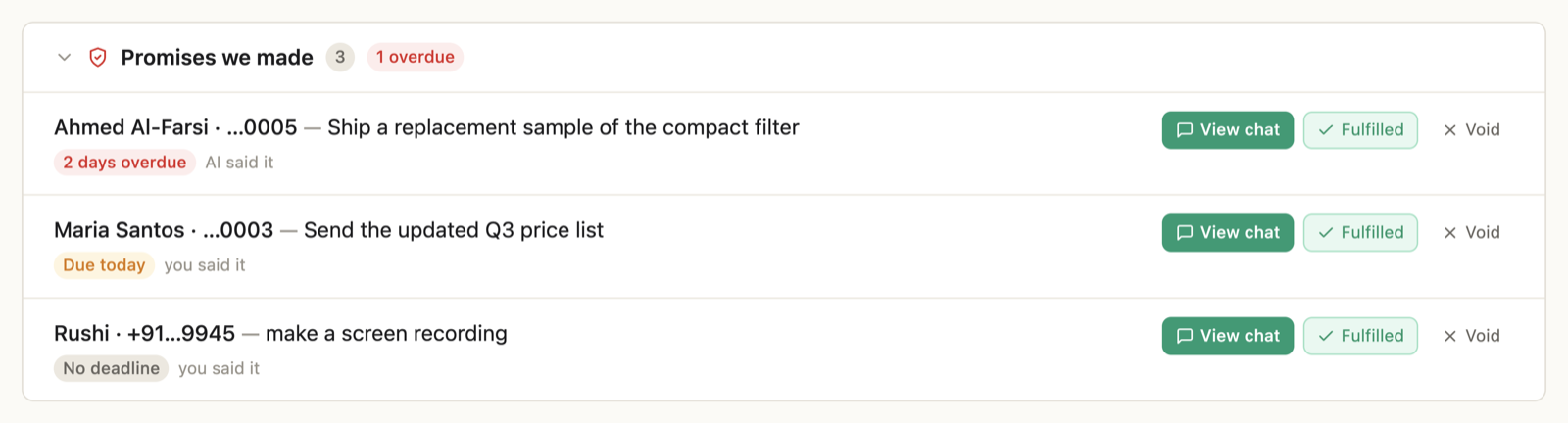
- Overdue or due today → it shows at the top of your briefing too.
- When a promise comes due, the AI drafts the follow-through message for you — promise follow-ups are never sent automatically, you always review them.
- Kept it already? Tap Fulfilled. No longer relevant? Void.
Approving a follow-up sends a message; it does not ship a sample or fulfill a promise for you. Confirm the underlying work before telling the customer it is done.
✓ Done when nothing in the ledger is overdue.
Step 3 — Read the board
Below the briefing sits the pipeline board — every active conversation filed into four columns, automatically:
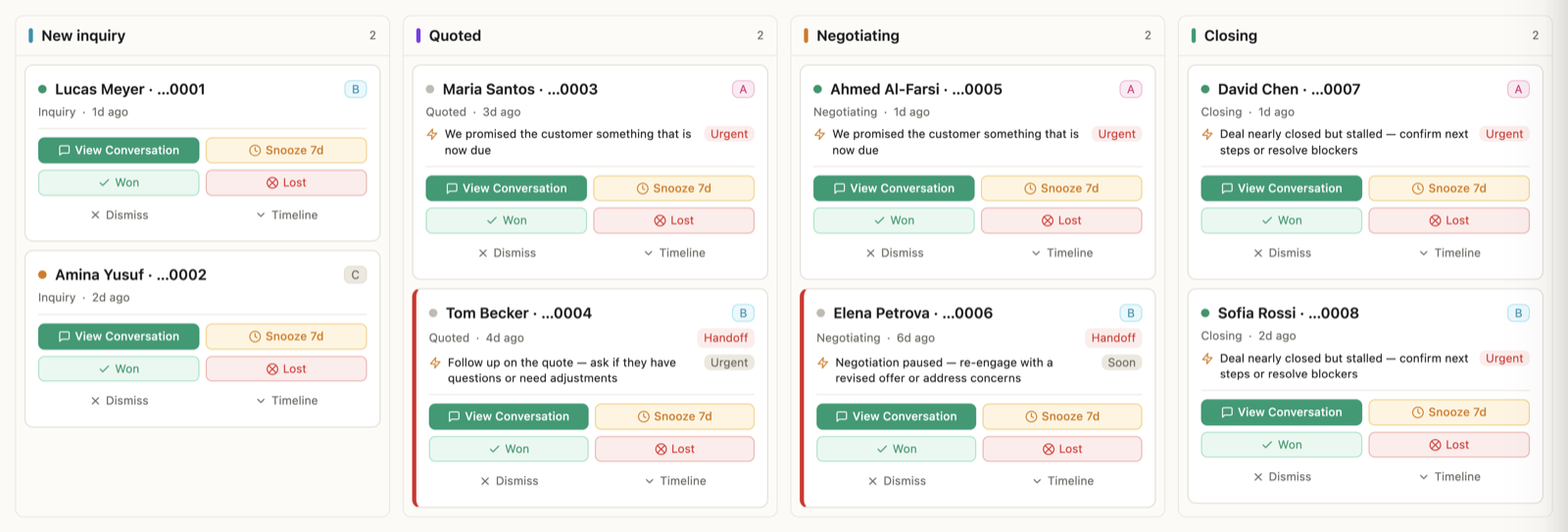
New inquiry → Quoted → Negotiating → Closing. Cards move on their own as conversations progress; if one lands wrong, drag it to the right column.
On each card:
- View Conversation — jump into the chat.
- Won / Lost — close it out. Be honest here; outcomes make everything smarter.
- Snooze 7d — for "contact me next month" customers.
- Dismiss — not a deal, off the board.
Filters at the top narrow by customer tier (A–D), status (Active / Hesitating / Cooling), or flags like needs follow-up.
The tier is the AI's read of buying intent, taken from what the customer has actually said — pricing questions, payment terms, urgency, budget and timeline signals, whether they sound like the decision maker:
- A — strong buying signals such as pricing, payment terms and urgency. Prioritize review; a score is not a commitment to buy.
- B — actively engaged, asking detailed questions, but hasn't committed.
- C — interested but early stage. Needs nurturing.
- D — just browsing. Low priority for now.
Status tracks momentum: Cooling is a customer who was messaging regularly and has gone silent; Hesitating means the AI caught a hesitation signal in the customer's own messages.
✓ Done when the board matches reality: finished deals closed, noise dismissed.
Step 4 — Let the AI do the chasing
Between your check-ins, the AI tracks conversation momentum and can prepare follow-ups when a deal goes quiet. Review the pending action and timing for that customer. The selected mode determines whether a routine follow-up waits for approval or can send automatically.
An illustrative draft might reference the product and the customer's stated concern, then offer a next step:
Hi Ahmed, following up on the quotation for the 400W solar panels. You mentioned comparing options — would it help if I included our latest test certification and a revised price for the 2,000-unit volume?
Review the offer as well as the wording: only mention a certification or revised price your business can actually provide. AI must not create a new commercial commitment just to restart a conversation.
Three things worth knowing about how it behaves:
- Follow-ups reference the real conversation — the product they asked about, the price you quoted. Never "just checking in!"
- Eligible automatic follow-ups use the customer's local business hours. Drafts still wait for approval.
- In Suggest mode, every follow-up is a draft you approve first. In Auto mode routine follow-ups go out on their own — promise follow-ups still wait for you.
Want to handle someone personally? Open their contact panel and set "I'll follow up on [date]" — the AI won't touch that customer until your date passes.
Things that trip people up
"Cards are in the wrong columns." With limited or ambiguous history, some can land wrong. Read the chat and drag them where they belong. More conversation context can help, but does not guarantee the classification.
"Follow-ups feel too frequent." Reject drafts that are too early and review the learning panel. Follow-up pacing can be automatically made less frequent based on feedback; those changes are labeled and reversible. Style improvements apply only after repeated corrections, and each one can be revoked.
"I don't want any automatic sending." Stay in Suggest mode — every follow-up becomes a draft, nothing more.
"The board is empty." It fills from conversations as they happen — there's nothing to import or migrate, and the AI only tracks and follows up on customers who are already in a chat with you.
Frequently Asked Questions
Can I track WhatsApp customers without filling in a CRM manually?
WhatsApp AI Pro extracts customer information and deal signals from your chats and maintains a pipeline board. You still review uncertain assessments, correct stages, and mark outcomes. It reduces repetitive record keeping; it does not remove your responsibility for accuracy.
Does the AI CRM send follow-ups without asking?
In Solo Suggest mode, routine follow-ups wait as drafts. Solo Auto mode permits routine follow-ups to send within the configured controls. Promise follow-ups require approval. Team mode routes replies through human reps. Separately triggered win-back broadcasts have their own sending behavior; see the broadcast tutorial.
Is customer memory the same as a knowledge base?
No. Company knowledge contains your product facts and policies. Customer memory contains relationship context, such as needs, objections, stage and commitments. Both inform a useful sales reply.
Can the AI CRM replace my order or accounting system?
This workflow tracks conversations and follow-through. A person still confirms commercial exceptions, takes payment and enters orders in the system of record. Use the sales workflow guide to see the handoff points.
Next: Set up AI replies · Review replies from your phone · How the AI learns from corrections.