
The 11 Best WhatsApp AI Chatbots in 2026 (AI Agents Compared)
We compared the best WhatsApp AI chatbots and AI agents for 2026 — real LLM intelligence, no-API options, multilingual support, and official pricing. Here's which to pick.
Looking for the best WhatsApp AI chatbot in 2026? Start with the work you want it to handle: answering product questions, continuing a sales relationship, supporting a team across channels, or running campaigns. Then compare the connection and operating requirements. WhatsApp AI Pro focuses on business-grounded replies, customer memory and follow-ups on your existing number; the guides below show that workflow in detail.
Last verified: October 2, 2026. Public prices and the specific product and billing updates below were checked against official sources on October 2; G2 and Capterra ratings and review counts remain the September 11, 2026 snapshot.
Disclosure: WhatsApp AI Pro is our product, so we test it directly. Competitor findings below are based on their official documentation and public pricing, not identical hands-on deployments. We do not receive affiliate commissions from the tools ranked here.
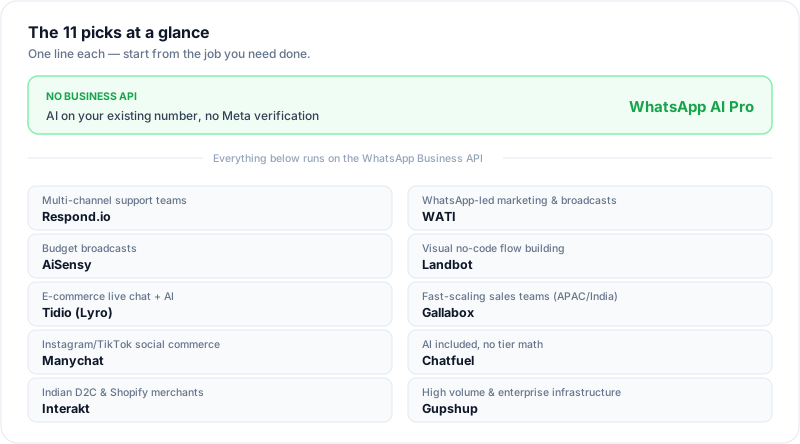
Quick Answer: The Best WhatsApp AI Chatbot for Each Need
- Best for AI auto-reply on personal WhatsApp: WhatsApp AI Pro — desktop app that connects your existing number, personal or Business app, by QR code; answers from your business knowledge, remembers each customer and tracks follow-ups. No Business API.
- Best for multi-channel support teams: Respond.io — autonomous AI agent across WhatsApp, Instagram, email, and more.
- Best for WhatsApp-led marketing and broadcasts: WATI — official Meta BSP, green-tick help, template campaigns.
- Best budget WhatsApp Business API option: AiSensy — low-cost broadcasts plus chatbot add-ons.
- Best visual no-code chatbot builder: Landbot — knowledge-grounded AI agents combined with drag-and-drop flows.
- Best for e-commerce live chat + AI: Tidio (Lyro AI) — resolves common questions automatically.
- Best for fast-scaling sales teams in APAC/India: Gallabox — shared inbox plus no-code bots.
- Best for Instagram/TikTok-led social commerce: Manychat — the category's biggest name, strongest on comment-to-DM funnels.
- Best AI-included packaging (no tier math): Chatfuel — one Business plan with AI credits and a knowledge base included.
- Best for Indian D2C and Shopify merchants: Interakt — catalog-aware AI agents on Haptik's stack.
- Best for high-volume and enterprise infrastructure: Gupshup — usage-priced BSP across 130+ countries.
If you want AI answering your existing WhatsApp number and helping you keep track of the customer afterward, jump to WhatsApp AI Pro. For the full product approach, see one AI brain for the customer journey. The connection method matters, but it is one part of the decision.
Do you need an answer, or help with the whole customer relationship?
A product question needs a reliable answer. A sale may also need a customer record, a due reminder and a follow-up after the quote. Compare those jobs separately, then inspect how the product connects them.
| What you want help with | Evidence to ask for | WhatsApp AI Pro walkthrough |
|---|---|---|
| Answering repeated product questions | A question tested against supplied prices, units and policies | Worked AI reply example |
| Remembering what each buyer needs | An inspectable customer record with needs, concerns and deal stage | AI CRM tutorial |
| Following up after a quotation | The conversation behind the follow-up, its timing and approval controls | Sales workflow |
| Improving future replies | The evidence behind each applied improvement and a way to undo it | Learning tutorial |
These walkthroughs explain our product. Use the same questions when evaluating other tools; a feature label alone does not show how a workflow behaves.
WhatsApp AI Chatbots Compared at a Glance
| Tool | AI type | Needs Business API? | Setup effort | Starting price | Best for | Reviews (G2 · Capterra) |
|---|---|---|---|---|---|---|
| WhatsApp AI Pro | Real LLM + knowledge base | No (QR / WhatsApp Web) | Easiest — QR scan, ~15 min | $49/mo · $499/yr | Small teams, desktop, no-API | — |
| Respond.io | Autonomous AI agent (RAG) | Yes | Hard — API + agent & CRM setup | $79/mo; AI at $159 | Multi-channel support teams | G2 4.8 (540) · Capterra 4.6 (60) |
| WATI | AI Automation + Astra | Yes | Moderate — Business API onboarding | Astra $99/mo or $79/mo annual | WhatsApp marketing, broadcasts | G2 4.6 (507) · Capterra 4.6 (207) |
| AiSensy | Knowledge-grounded AI agent (add-on) | Yes | Moderate — self-serve API onboarding | AI add-on $50/mo + platform | Budget broadcasts, optional AI | G2 4.4 (130) |
| Landbot | AI agents + visual flows | Yes | Moderate–hard — configure agent, data and flows | WhatsApp from $176/mo annual | Visual no-code flows | G2 4.7 (334) · Capterra 4.4 (70) |
| Tidio (Lyro) | Lyro AI agent | Yes (for WhatsApp) | Moderate — widget instant, API for WhatsApp | Lyro from $32.50/mo | E-commerce live chat | G2 4.6 (1,962) · Capterra 4.7 (590) |
| Gallabox | No-code bots + AI | Yes | Moderate — API + no-code builder | WhatsApp AI from $248/mo annual | Sales teams (APAC/India) | G2 4.6 (169) |
| Manychat | LLM steps inside flows | Yes | Moderate — polished builder, API for WhatsApp | Pro $29/mo annual | Instagram/TikTok social commerce | G2 4.5 (165) · Capterra 4.6 (72) |
| Chatfuel | AI agent + knowledge base | Yes | Moderate — free trial, Coexistence supported | Business $20/mo or $18/mo annual | AI-first SMBs, simple pricing | — |
| Interakt | RAG agents (add-on) | Yes | Moderate — API + AI add-on + catalog setup | $55/mo Growth + $74.99 AI add-on | Indian D2C, Shopify | — |
| Gupshup | LLM agents (enterprise) | Yes | Hardest — sales-led AI deployment | $0.001/message + Meta fees; AI custom | Volume, enterprise, emerging markets | — |
Pricing last checked October 2, 2026. Figures are advertised entry points for the relevant capability; annual billing is marked and shown as a monthly equivalent. WhatsApp AI Pro's $49 and Interakt's $55 + $74.99 figures use monthly billing. Taxes, Meta messaging fees, contacts, seats, credits, and overages may be extra. Vendor pricing changes frequently, so follow the linked official source before buying. "Needs Business API" changes onboarding, messaging fees, and number requirements.
Meta messaging fees changed on October 1, 2026. Under Meta's current WhatsApp Business Platform pricing, each business phone number gets 1,000 free delivered service messages per month, with service-message charges starting at message 1,001. Utility templates sent inside the 24-hour customer service window are now chargeable too. Inbound user messages remain free, and eligible free-entry-point windows still exempt marketing, utility, authentication and service messages. The change takes effect in the messaging account's timezone; separate pricing policies apply to AI providers and eligible government/nonprofit accounts.
How We Judged: What Makes a Real WhatsApp AI Chatbot
We ranked the tools for small-to-mid-sized businesses using six factors: genuine LLM reasoning, answers grounded in business knowledge, multilingual support, human approval and handoff, data handling, and the realistic cost of enabling AI on WhatsApp. The initial documentation review covered all eleven tools on September 8, 2026; public pricing and the product and billing updates in this revision were checked on October 2. Annual prices are shown as monthly equivalents where the vendor does so; usage and Meta fees are called out separately when published.
This is a fit-based comparison, not a lab benchmark. WhatsApp AI Pro was tested directly because it is our product. For competing products, we verified documented features and current public prices but did not claim identical production testing. That distinction matters because the single most common mistake is paying for a "rule engine wearing an AI costume."
Public reviews as a second opinion. Where we link a tool's G2 or Capterra profile, the rating and review count are as of September 11, 2026, so you can read verified user feedback instead of taking our word for it.
1. Real LLM intelligence, not keyword matching. A huge number of WhatsApp chatbot tools market themselves as AI but are keyword systems. Customer says "price" → it sends the price list. Customer phrases something unexpectedly → "I'll connect you with a team member." That's a glorified auto-responder.
The test: message the bot in a language it wasn't explicitly configured for, and ask a specific product question using unusual phrasing. A real LLM answers accurately. A rule engine replies with a generic template or breaks. Skip anything that fails this — it doesn't matter how pretty the dashboard is.
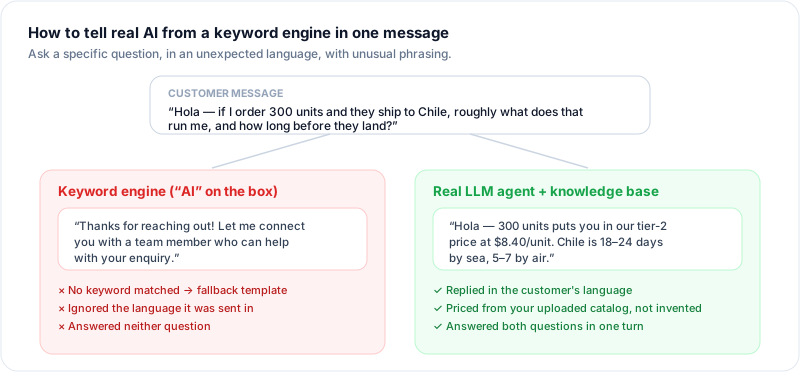
2. Knowledge-base grounding. The best WhatsApp AI chatbots let you upload your catalog, pricing, shipping policy, and FAQs, then answer from your business facts — not generic responses, and not invented prices.
3. Multilingual from day one. If even 10% of your customers speak another language, you're losing revenue to it. Strong tools detect the customer's language and reply in it natively — one agent, not a separate bot you build and maintain per language.
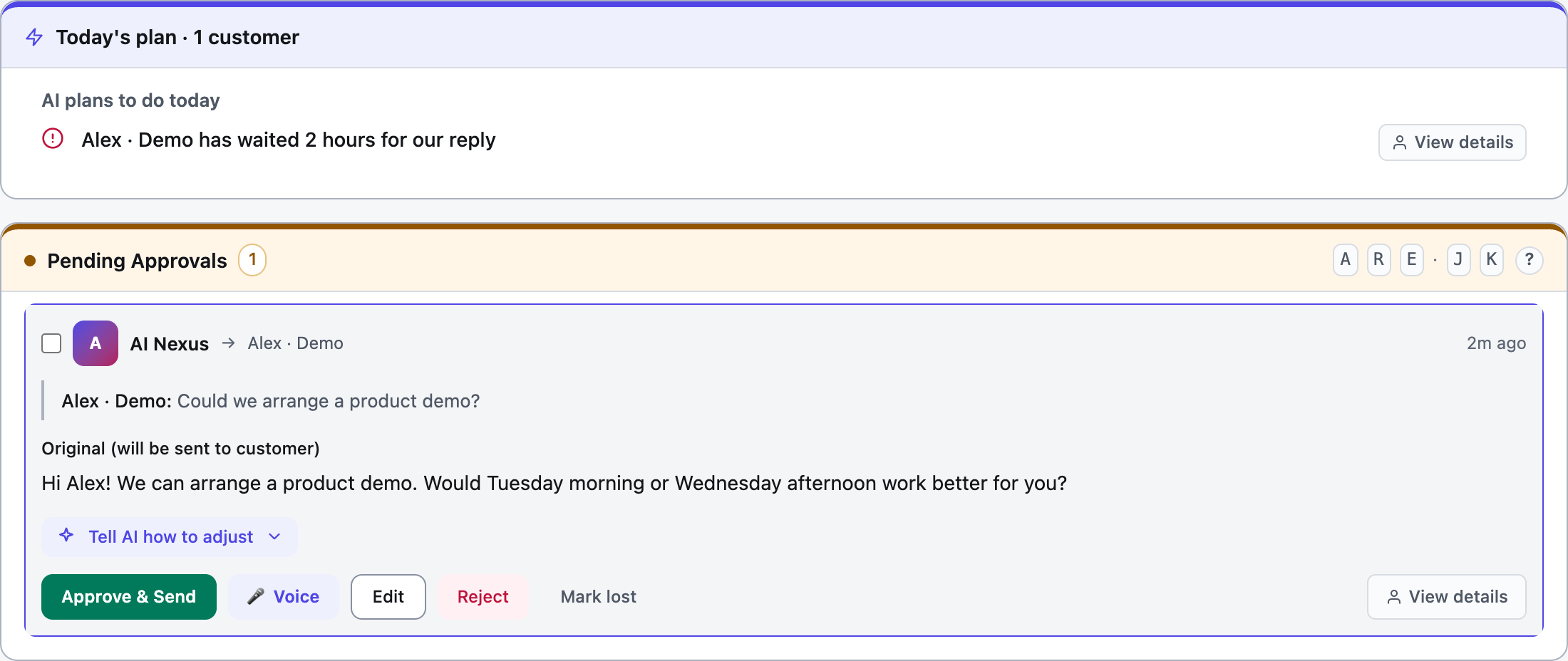
4. A draft / approval mode. Never go fully automatic on day one. The best tools let the AI suggest a reply that you approve with one click, so you catch wrong prices and made-up policies before customers do. Any tool that forces all-manual or all-auto with no middle ground is a red flag.
5. Clear data handling. Compare local storage separately from online processing. AI requests can include conversation context and business information sent to the service that generates a reply. Review what each feature sends and stores, including shared inboxes and integrations, before using it with sensitive information.
Now the list, ordered by how well each fits a small-to-mid business — the buyers most often burned by the wrong pick.
The 11 Best WhatsApp AI Chatbots in 2026
1. WhatsApp AI Pro
Best for: small teams and cross-border sellers who want AI to answer product questions, remember customers and prepare follow-ups on their existing WhatsApp number without the Business API.
WhatsApp AI Pro is a desktop app for macOS and Windows that connects to your existing WhatsApp account by QR code — the same flow as WhatsApp Web — then adds one workspace assistant, real-time translation across 90+ languages, and a knowledge-base-grounded reply engine over your conversations.
Why it stands out:
- No WhatsApp Business API. No Meta business verification, no BSP onboarding, no template infrastructure. You reply as your existing number.
- Local storage and online AI processing. The desktop app stores data locally, but generating AI replies sends relevant conversation and business context to our backend and the AI service used for the request. Local storage does not mean no data leaves the device or that compliance is automatic. Shared web features and integrations have additional data flows; assess them for your use case.
- Current business facts, not canned answers. Upload your catalog, pricing, and FAQs, or connect a spreadsheet. The agent answers in natural language from real business data.
- It asks instead of guessing. If an important business fact is missing, the agent can ask you a focused question with answer options, use your answer to finish the customer reply, and remember the confirmed fact for next time. Complaints, negotiations, and other true human moments still hand off with the full context.
- Customer memory and a plan for what happens next. The agent records preferences, objections, deal stage and detected promises for your review. Today's Plan brings together customers needing attention, pending actions and due commitments. The CRM walkthrough shows how to inspect and correct that context.
- Learning you can undo. Rejected drafts, edits and rewrite requests build evidence in the background. Improvements the evidence supports apply automatically, each one shows its evidence and can be undone, and the automatic pacing adjustment can only make follow-ups less frequent. See Learning History.
- Voice in and voice out. It understands customer voice notes, and a text draft can become a natural voice reply that you preview before sending — useful when the customer prefers talking to typing.
- Solo and Team modes: Solo mode runs fully automatic, draft approval, or observe-only, so you can build trust gradually. Team mode turns every incoming message into a draft for your reps.
- Enterprise Inbox: on the Enterprise plan, reps work from a shared web workspace — claim a conversation in the browser, review the AI draft, reply — with nothing to install. See the Enterprise Inbox tutorial.
- 90+ language auto-translation, built in, not a premium add-on.
Honest trade-offs: no green-tick verification (you run as a regular WhatsApp account), no high-volume template broadcast infrastructure, and the desktop app needs your computer on to keep the assistant running (a spare desktop PC or laptop left running solves this). It's built for handling inbound and warm outbound — not cold mass campaigns.
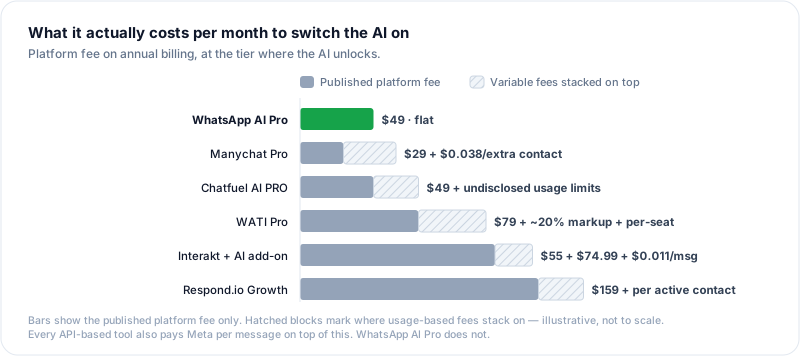
Pricing: $49/month, or $499/year. Start with a free 14-day trial with no credit card. Paid plans come with a 7-day money-back guarantee. No per-contact, per-agent, or per-message fees — the bill is the bill.
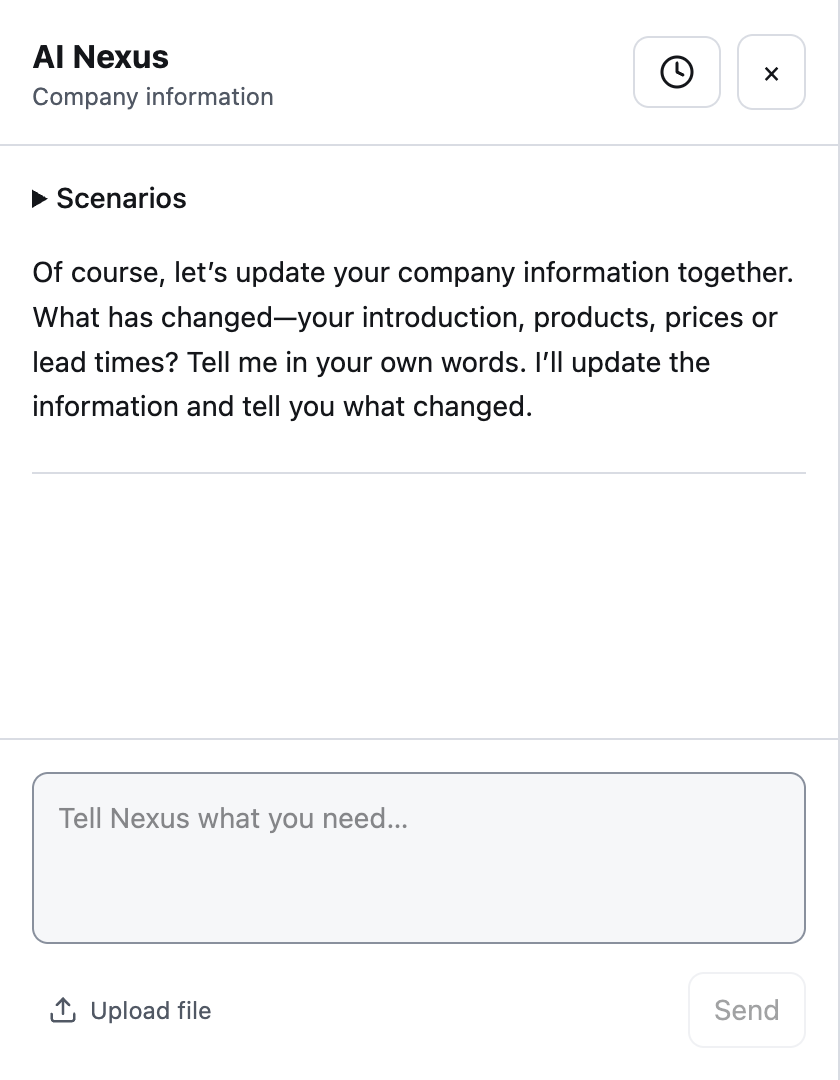
Desktop 2.1: one AI Nexus. Update company facts and lasting reply preferences in one conversation, and adjust a pending draft in its own compact chat. CRM, clarification, research and learning remain in their existing screens. See the AI Nexus guide and current download.
2. Respond.io
Best for: support teams running conversations across many channels.
Respond.io is an omnichannel platform — WhatsApp, Messenger, Instagram, TikTok, email, SMS, and web chat in one inbox — that's pushed hard into autonomous AI. Its AI Agent is grounded against your knowledge base, holds multi-turn conversations, qualifies leads, updates CRM records, and escalates to humans when context demands. Its pricing page also lists AI Agents for voice calls.
Strengths: broadest channel coverage here; the most mature autonomous AI agent; deep CRM integrations (Salesforce, HubSpot, custom HTTP, webhooks).
Watch out for: it requires the WhatsApp Business API, and pricing is per Monthly Active Contact (MAC), so cost grows with audience size. According to Respond.io's pricing page, the AI Agent unlocks at Growth — $159/mo with annual billing ($199 monthly) — while Starter begins at $79/$99. Growth at 1,000 MACs includes 10,000 AI credits per billing cycle. The AI credits documentation specifies automatic overages at $15 per additional 1,000 credits, rounded up; AI pauses when total usage reaches 200% of the included allowance. Full breakdown in our WhatsApp AI Pro vs Respond.io comparison.
Public reviews (Sept 11, 2026): G2 4.8/5, 540 reviews · Capterra 4.6/5, 60 reviews
3. WATI
Best for: WhatsApp-first teams that send broadcasts and want hand-held API onboarding.
WATI is a WhatsApp Business Solution Provider built around the WhatsApp Business API: shared inbox, template manager, broadcast campaigns, a decision-tree chatbot builder, and click-to-WhatsApp ad tracking. Its guided onboarding is useful for teams moving onto the API for the first time.
AI: WATI's separate Astra product provides knowledge-grounded WhatsApp and web agents, multilingual conversations, human transfer, and multiple agents in one workspace.
Watch out for: Astra and the main WATI platform are priced separately, so compare the complete setup rather than one headline number. Astra Pro is $99 month-to-month or $79/mo on annual billing and includes 5,000 credits; extra credits and Meta messaging charges can raise the total. See the full WATI alternative breakdown.
Public reviews (Sept 11, 2026): G2 4.6/5, 507 reviews · Capterra 4.6/5, 207 reviews
4. AiSensy
Best for: budget-conscious broadcast teams that also want an optional AI agent.
AiSensy is a popular, low-cost WhatsApp Business API platform — especially strong in India and emerging markets — focused on broadcast campaigns, click-to-WhatsApp ads, and a chatbot builder. Its AI Agent add-on supports knowledge-base answers, long-term user memory, and tools and API integrations. That makes it an option for broadcasts plus AI-assisted conversations, rather than only scripted replies.
Watch out for: it's API-based, so Meta onboarding and messaging fees still apply. The AI Agent add-on is $50/mo for 1,000 AI messages, on top of the platform plan. Confirm that the included message allowance and tool actions cover your use case before committing.
Public reviews (Sept 11, 2026): G2 4.4/5, 130 reviews
5. Landbot
Best for: teams that want to design conversational flows visually.
Landbot combines a drag-and-drop flow builder with no-code AI agents for web and WhatsApp. Agents can answer from text, documents, public URLs and live API data, with scheduled source refreshes and human handoff carrying the conversation transcript and collected fields. You can blend open-ended AI responses with controlled branching, conditions and data capture in the same workflow.
Watch out for: WhatsApp runs through the Business API, and WhatsApp with your own number starts on the Professional plan: Landbot's pricing page shows $176/mo on annual billing or $220 month-to-month once WhatsApp is added, including one WhatsApp number and 500 AI chats. You still need to configure knowledge sources, integrations and the surrounding flows. Best when you want AI agents together with fine control over conversation design.
Public reviews (Sept 11, 2026): G2 4.7/5, 334 reviews · Capterra 4.4/5, 70 reviews
6. Tidio (Lyro AI)
Best for: small e-commerce stores that want live chat plus an AI that resolves routine questions.
Tidio is a widely used SMB live-chat and helpdesk tool, and its Lyro AI agent automatically answers common customer questions across channels including WhatsApp. The first 50 Lyro conversations are free for the lifetime of an account, and the e-commerce integrations (Shopify and others) are solid.
Watch out for: WhatsApp connection still goes through the Business API, and Lyro's automated-conversation allowance is metered. Paid Lyro plans start at $32.50/mo for 50 AI conversations, so heavier volume pushes you up the tiers. Strongest as a website-first tool that also covers WhatsApp, rather than a WhatsApp-first product.
Public reviews (Sept 11, 2026): G2 4.6/5, 1,962 reviews · Capterra 4.7/5, 590 reviews
7. Gallabox
Best for: fast-scaling sales teams, particularly across APAC and India.
Gallabox is a WhatsApp Business API platform built around a shared team inbox, a no-code bot builder, drip campaigns, and increasingly capable AI, with integrations into Shopify, CRMs, and Zapier. Sales-oriented teams that want WhatsApp as a pipeline channel tend to like its workflow tooling and per-seat clarity.
Watch out for: API-based onboarding and Meta messaging fees still apply. Gallabox's cheapest plan includes AI agents only for the web; WhatsApp AI agents begin on Essential, advertised at $248/mo on annual billing or $331/mo quarterly, with 2,000 AI credits. That is a very different budget from its entry-level positioning.
Public reviews (Sept 11, 2026): G2 4.6/5, 169 reviews
8. Manychat
Best for: creators and social-commerce brands running Instagram and TikTok funnels, with WhatsApp as a second channel.
Manychat is the biggest name in this category, and it earned that on Instagram rather than WhatsApp. Comment-to-DM automation is the thing it does better than anyone here. Its AI is real — the AI Step takes up to 10,000 characters of context and adapts to what the customer actually says, and Intention Recognition works on intent rather than keywords.
Strengths: unmatched for social-first funnels; enormous template and creator ecosystem; the AI genuinely reasons rather than pattern-matching.
Watch out for: WhatsApp is not available on the entry Essential plan, so the real WhatsApp starting point is Pro at $29/mo with annual billing, including 2,500 active contacts. For WhatsApp, AI Step uses context configured inside a flow. Manychat also offers AI Knowledge with text and link sources, but that feature is currently Instagram-only; don't assume the same knowledge-base setup is available on WhatsApp. Pricing scales with active contacts, and availability can vary by country, so verify the checkout total for your market.
Public reviews (Sept 11, 2026): G2 4.5/5, 165 reviews · Capterra 4.6/5, 72 reviews
9. Chatfuel
Best for: SMBs that want an AI agent on WhatsApp and Instagram without doing tier math.
Chatfuel sells one Business plan at $20/mo, or $18/mo billed annually ($216/year), including $20 of AI credits per month. Every plan starts with a free trial. The plan covers automatic lead qualification, in-chat selling, comment auto-replies, bulk WhatsApp campaigns, meeting booking, and CRM sync. Everything AI is packaged together, which makes the starting price easy to understand. It also supports Coexistence, so you can connect a number already running the WhatsApp Business App.
Strengths: simplest AI-inclusive packaging here; a knowledge base rather than prompt-stuffing; unlimited contacts and messages on the plan.
Watch out for: AI runs on a fair-use allowance. Chatfuel's usage limits page says contacts and messages are unlimited, but AI processing is capped per billing period, and each reply uses more of it as your knowledge base, instructions, and conversation history grow. If you hit the cap, the bot stops replying until you renew early or the next period starts. Above Business, the only published tier is for agencies. They also don't name the model behind their AI, and they don't state whether Meta's per-message fees carry a markup.
10. Interakt
Best for: Indian D2C and Shopify merchants who want catalog-aware AI.
Interakt (part of Jio Haptik) is the most clearly knowledge-grounded of the newer entries: its WhatsApp AI Agents are trained on your website, docs, and product catalog, and it explicitly positions them against pre-defined FAQ workflows. For a store whose questions are mostly "is this in stock, what does it cost, where's my order," catalog context is the right shape.
Strengths: real RAG grounding on your own content; deep commerce and catalog integration; strong local support and payments in India.
Watch out for: the AI pricing stacks. On monthly billing, WhatsApp starts at the Growth plan at $55/mo plus taxes; annual Starter can use WhatsApp as its one channel. WhatsApp AI Agents are a $74.99/mo add-on sold only with Growth and Advanced, with 100 AI messages included, then $0.011 per AI message. The pricing page lists Shopify integration as included only on the Shopify plan, so confirm that package if store integration is central to your setup. Don't confuse the AI add-on with the "linear" and "branching" chatbot builders included in the platform tiers; those are rule-based.
11. Gupshup
Best for: high-volume senders and enterprises that need infrastructure across many countries and channels.
Gupshup is a BSP operating at a different scale from everyone else here — 50,000+ businesses across 130+ countries, plus RCS, SMS, and voice alongside WhatsApp. Its AI Agents are LLM-based with tool access, multi-turn context, and stated guardrails against hallucination.
Strengths: genuine infrastructure depth, especially in India and Southeast Asia; multi-channel beyond WhatsApp; usage-based pricing with no subscription floor, which suits spiky volume.
Watch out for: it isn't really a self-serve SMB AI product. Gupshup's self-serve WhatsApp pricing lists a $0.001 platform fee per message on top of Meta's country- and category-specific charges, but AI Agent pricing is not public. Enterprise AI therefore requires a sales conversation, and total cost depends on message type, destination, and volume.
How to Choose the Right WhatsApp AI Chatbot
Start with the customer work you want to delegate, then check the connection model, operating requirements and total cost. If you need follow-through after the first reply, inspect customer memory, due commitments and follow-up controls as carefully as answer quality. The Business API decision is one of those requirements, not the whole selection process.
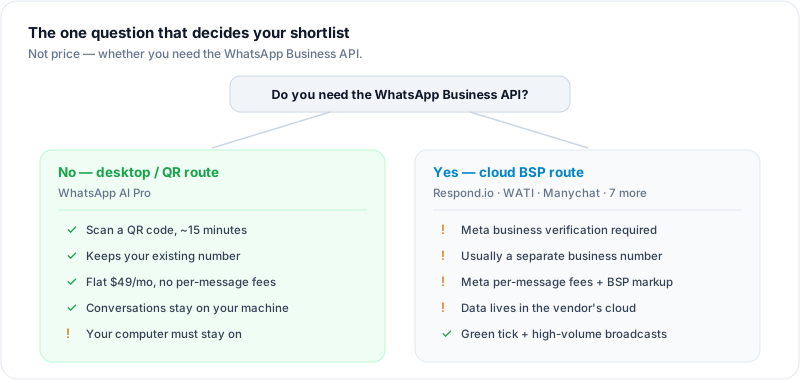
An API connection does not always require a new number. Providers including WATI and Manychat support Coexistence for eligible WhatsApp Business App accounts, allowing the existing app and number to remain in use alongside the API. Eligibility and onboarding requirements vary; API messaging fees still apply.
| Your situation | Best pick |
|---|---|
| Want AI on your existing WhatsApp number, no Meta verification | WhatsApp AI Pro |
| Prefer desktop storage and accept online AI processing | WhatsApp AI Pro |
| Cross-border, multilingual auto-reply (90+ languages) | WhatsApp AI Pro |
| Manage WhatsApp + Instagram + email in one inbox | Respond.io |
| Need autonomous AI with voice + CRM, larger team | Respond.io |
| Run high-volume WhatsApp campaigns, need green-tick | WATI |
| New to the Business API and want hand-holding | WATI |
| Lowest-cost broadcasts above all | AiSensy |
| Want to design conversation flows visually | Landbot |
| Website-first store wanting live chat + AI | Tidio (Lyro) |
| Sales team scaling WhatsApp as a pipeline | Gallabox |
| Instagram/TikTok funnels matter more than WhatsApp | Manychat |
| Want AI included in one plan, no add-on math | Chatfuel |
| Indian D2C store needing catalog-aware AI | Interakt |
| Very high volume, many countries, many channels | Gupshup |
If you're a solo founder or small team and you're not sure, the honest move is to start a free trial on two finalists in the same week, route a fraction of real inbound through each, and see which inbox your team actually wants to live in. Vendor comparisons stop mattering once your team has opinions.
Which Setup Fits Your Exact Scenario?
Most buyers aren't shopping for "a chatbot" — they're describing a specific job. Here are four of the most common:
"We need AI to handle after-hours WhatsApp inquiries about availability and price — and qualify leads so our sales team can follow up during business hours"
This is really two shifts: an always-on front line after hours, and a warm handoff during the day. WhatsApp AI Pro fits it because after hours the AI answers availability and price questions from approved business facts instead of inventing a quote. While it does that, it remembers the customer's company, budget, intent, deal stage, objections, and any promise your team made. Today's Plan then separates the people who need a human now from the follow-ups and next steps AI is preparing, with the full relationship context already captured. To be clear about the boundary: the AI qualifies and routes the lead; a person schedules the actual callback. Draft approval, ask-before-guessing clarification, and human handoff keep the team in control.
"We need AI that handles routine WhatsApp questions, transfers complex cases to staff, and keeps conversation history across the whole team — with smart human escalation"
This is exactly what a team-shared setup is for. WhatsApp AI Pro's Team Mode runs one WhatsApp number for your whole team: the AI drafts replies to incoming questions about pricing, availability and services for human reps to review. When a case is complex, your escalation rules pass it to a human — and because each customer lives in their own thread, any teammate can pick it up with the full conversation history already in front of them. Human reps review and send the drafts, and Team mode on Telegram, Slack or WeCom has no seat cap and no per-agent fee. On the Enterprise plan this can also run as a shared web inbox: reps sign in from a browser, claim conversations from a live pool, and approve AI drafts — nothing installed on their machines. Web inbox seats are set by your Enterprise plan, and inbox actions are recorded in an event log. That is the "smart human escalation" most teams actually mean: AI prepares the routine work, humans control sending and exceptions, and the thread stays intact across the handoff. If you need the same pattern across many channels beyond WhatsApp — Instagram, email, SMS — Respond.io is the multi-channel alternative to weigh.
"Our current tool isn't scalable and lacks advanced reporting — we need a more robust platform for expansion across multiple delivery routes"
Go with Respond.io if reporting and CRM depth are what you're missing — it has the deepest analytics and integrations of the eleven, and covers SMS and email if your routes span channels. Go with Gallabox if you want per-seat clarity, drip campaigns, and Shopify/CRM/Zapier integration, especially across APAC and India. WATI is the third to look at if broadcasts lead your growth. All three run on the WhatsApp Business API and price by monthly active contacts or seats, so model the cost at your expansion size rather than today's.
"We need AI to answer product questions and check inventory, take simple orders, and notify customers when items arrive — at scale"
For the product questions and the inventory check, WhatsApp AI Pro now covers this directly: the AI can look up the spreadsheet you already track stock in; replies quoting a price or delivery time from it wait for your approval (setup tutorial). If you want the whole job — orders and arrival notifications included — running at campaign scale on the Business API, Interakt is the closest fit: its AI agents train on your product catalog and it integrates deeply with Shopify. For the arrival notifications specifically — template messaging at volume — AiSensy is the low-cost route and Gupshup the one built for real scale across many countries. Respond.io is worth a look too if you want the order conversation and CRM records in one place.
Frequently Asked Questions
What is the best WhatsApp AI chatbot in 2026?
There's no single winner — it depends on whether you need the WhatsApp Business API. For small teams that want AI on their existing number with no Meta verification and local storage with online AI processing, WhatsApp AI Pro is the strongest fit. For multi-channel support teams, Respond.io's autonomous AI agent leads. For WhatsApp-led marketing and broadcasts, WATI is built for that shape.
How much does a WhatsApp AI chatbot cost?
Anywhere from free (basic rule-based bots with severe limits) to $500+/month for enterprise cloud platforms. The sweet spot for small and mid-size businesses is roughly $50–150/month for a tool with real AI. Watch for hidden costs on Business API platforms: per-message Meta fees, per-user charges, and markups can push the real bill 30–50% above the sticker price. The total depends on message volume, active contacts, user seats and AI usage, with each platform metering these differently.
Can I use a WhatsApp AI chatbot without the WhatsApp Business API?
Yes. Desktop tools like WhatsApp AI Pro connect through WhatsApp Web by scanning a QR code — no API approval, no Meta business verification, no per-message fees, and it works with your existing WhatsApp number. Cloud platforms (Respond.io, WATI, Gallabox, AiSensy, Manychat, Chatfuel, Interakt, Gupshup, and others) all require the Business API for WhatsApp.
What's the difference between a WhatsApp AI chatbot and an AI agent?
A traditional chatbot follows scripted rules or decision trees. An AI agent uses a large language model to understand context, answer open-ended questions from your knowledge base, and take actions like qualifying leads or escalating to a human. In 2026 the best WhatsApp tools are agents, not rule-based bots — test for it before you buy. For a comparison focused on owner workload, business judgment and the work after a reply, see WhatsApp AI agents: workflows and owner control.
How do I know if a WhatsApp chatbot uses real AI?
Message it in a language it wasn't configured for and ask a specific question with unusual phrasing. A real LLM-powered agent answers accurately; a keyword engine replies with a generic template or breaks. Also check whether you can upload your own documents (catalog, pricing, FAQs) — genuine AI tools ground answers in your business facts.
Will customers know they're talking to an AI?
With a well-trained knowledge base, most can't tell — and most don't care. Customers want a fast, accurate answer, not proof a human typed it. Running in draft/approval mode at first keeps replies on-brand while the AI learns your style.
Want to see how an AI chatbot performs on your real conversations? Download WhatsApp AI Pro, scan the QR code in about 2 minutes, and try it in draft mode on a live chat. Start with a free 14-day trial, no credit card needed; after that it's $49/month (or $499/year), with a 7-day money-back guarantee.
Related guides: