
Respond.io vs WATI 2026: Real Pricing + Verdict
Respond.io 2026 pricing: $79–$349/mo, AI Agent unlocks at $159. WATI from $39/mo + ~20% Meta markup. Full tier tables, hidden fees, and a lighter no-API alternative.
Respond.io vs WATI: The Quick Verdict
Both connect to the WhatsApp Business API. Both ship a team inbox, automation, and AI. But they're built for different teams.
- Pick WATI if WhatsApp is your primary channel and you want broadcast campaigns, official Meta templates, green-tick verification, and fast onboarding into the WhatsApp Business API. Marketing teams running CTWA ads or sending campaigns to opted-in lists fit here.
- Pick Respond.io if you handle conversations across multiple channels — WhatsApp + Instagram + Messenger + email + TikTok — and want one inbox plus an autonomous AI Agent that can take voice calls, qualify leads, and update your CRM. Larger support teams with mixed channels fit here.
If neither describes you — if you don't actually want WhatsApp Business API onboarding, don't have a team big enough to justify $200+/month, and just want AI to answer your existing WhatsApp number — there's a third option (WhatsApp AI Pro) covered after the main comparison.
All pricing in this article is verified as of May 2026. Vendors update plans frequently, so check each site for the latest.
WATI vs Respond.io: At a Glance
| WATI | Respond.io | |
|---|---|---|
| Type | WhatsApp-first BSP, expanding to other channels | Omnichannel customer messaging platform |
| Channels supported | WhatsApp, WhatsApp Business Calling, Facebook, Instagram, web widget, wa.me, QR | WhatsApp, Messenger, Instagram, TikTok, Email, SMS, web chat, voice |
| WhatsApp Business API | Yes — official Meta BSP, "zero-fee" setup help | Yes — via partner integrations |
| Green-tick verification | Yes, with hands-on help | Yes |
| Template broadcasts | Yes — primary use case | Yes |
| Bulk message limits | Up to 4k messages/min on Business plan | Standard Meta API limits |
| Team inbox | 3 users (Growth) / 5 users (Pro+) | Designed for multi-agent teams |
| Workflow / automation | No-code chatbot builder + Astra AI flows | No-code visual workflow builder + HTTP requests |
| AI capability | AI Automation (Pro), Advanced AI Agents (Business), separate Astra product | Autonomous AI Agent with RAG, multimodal (text/image/voice), CRM-aware |
| CRM / e-commerce integrations | Shopify, HubSpot, Zapier | Salesforce, HubSpot, Shopify, Zapier, custom HTTP, webhooks |
| Pricing model | Tiered base plan + per-extra-user + Meta message markup | Per Monthly Active Contacts (MAC) |
| Starting price (annual) | $39/mo (Growth, 3 users, 1 channel) | $79/mo (Starter, 1,000 MACs) |
| Starting price (monthly) | $49/mo (Growth) | $99/mo (Starter) |
| AI features unlock at | $79/mo (Pro) — AI Automation | $159/mo (Growth) |
| Extra user fees | $24/user/mo (Pro), $59/user/mo (Business) | Included; MAC overage ~$12-15/100 |
| Meta message markup | ~20% over Meta's official rate | Pass-through (no markup) |
| Free service conversations | 1,000/month included | Standard Meta tier passed through |
| Setup time (no existing API) | A few business days — WATI handles BSP onboarding | Days to weeks — more self-serve |
| Best for | WhatsApp-led marketing, bulk campaigns, CTWA | Multi-channel support teams, B2C with mixed inbox |
There's enough overlap to make these two feel like direct competitors, but the right choice almost always comes down to one question: how many channels do you actually run? If WhatsApp is 80%+ of your inbound, WATI is built for that. If it's one of four or five, Respond.io's multi-channel design earns its keep.
What WATI Actually Is
WATI started as a WhatsApp Business API tool — a clean shared inbox, template messages, broadcast campaigns. It still leads with that, but the 2026 product is broader than the "WhatsApp only" label many comparison articles still use.
Channels. WhatsApp, WhatsApp Business Calling, Facebook Messenger, Instagram, plus a web widget and wa.me link. Not at Respond.io's breadth, but more than just WhatsApp.
Core features. Shared team inbox, template message manager, broadcast campaigns, decision-tree chatbot builder, Click-to-WhatsApp Ads (CTWA) tracking, contact tagging, multi-WhatsApp-number support on the Business tier.
AI. Two layers in the platform itself. The Pro plan ships "AI Automation" — answer queries, collect information, send reminders. The Business plan ships "Advanced AI Agents" alongside higher message limits and Google Ads integration. WATI also has a separate AI product called astra, positioned as a more capable agentic layer for revenue-focused teams.
Where it shines. Onboarding. WATI handles your WhatsApp Business API setup including business verification, which is the most painful part of getting onto the API. Most teams are sending messages within a few business days.
Where it doesn't. Pricing transparency. The headline number ($39/mo Growth annual, $79/mo Pro annual) is just the platform fee. WATI adds approximately a 20% markup on Meta's per-conversation message fees, plus per-user fees on Pro and Business tiers. A 5-person Pro team sending 5,000 marketing messages/month to mixed-region recipients usually ends up paying 30-50% above the headline rate once Meta fees and markups are layered in.
WATI's pricing breakdown (May 2026, annual billing)
| Plan | Price/mo | Users | Extra user | Notes |
|---|---|---|---|---|
| Growth | $39 | 3 included | Not allowed | 1 channel only, basic chatbot, no AI |
| Pro | $79 | 5 included | $24/mo | AI Automation, multi-channel, CTWA tracking |
| Business | $199 | 5 included | $59/mo | Advanced AI agents, 4k msg/min, multiple WA numbers |
Monthly billing is roughly 25% higher: Growth $49, Pro $99, Business $249.
Hidden fees to budget for:
- ~20% markup on Meta per-conversation message fees (verified by independent reviews)
- Chatbot session caps after 1,000-5,000/month, with additional triggers charged per 1,000
- Marketing, utility, and authentication conversations don't count toward the free 1,000 service conversations
What Respond.io Actually Is
Respond.io is an omnichannel customer conversation platform that's pushed hard into autonomous AI through 2025-2026. It's no longer a "shared inbox with chatbot" — the marketing language is now "AI-powered customer conversation management software."
Channels. WhatsApp, Facebook Messenger, Instagram, TikTok, email, SMS, web chat, plus WhatsApp Business Calls, Messenger Calls, and VoIP unified into the same conversation thread. This is the broadest channel coverage in this comparison.
Core features. Multi-agent shared inbox, no-code visual workflow builder, contact lifecycle tracking, internal notes, agent assignment, broadcast campaigns, in-thread voice calls, deep CRM integrations (Salesforce, HubSpot, custom HTTP requests, webhooks).
AI. Respond.io's AI Agent is the more aggressive AI play of the two. It's autonomous — RAG-grounded against your knowledge base, can hold natural multi-turn conversations, take voice calls, qualify leads, schedule meetings, update CRM records, and escalate to human agents when context demands it. Multimodal input (text, image, PDF, voice) is supported. The architecture is positioned as orchestrator + micro-agents.
Where it shines. Multi-channel teams. If you have a single support workflow that needs to ingest WhatsApp, Instagram DMs, email, and a website widget, Respond.io is built for that exact shape. The autonomous AI Agent is also a real differentiator from the "decision tree" chatbots most BSPs ship.
Where it doesn't. Cost at scale, and AI gating. Pricing is per Monthly Active Contact (MAC), so cost grows with the size of your audience whether or not you're sending many messages. AI Agent features only unlock at the Growth tier ($159/mo annual, $199/mo monthly), so the entry-level Starter plan is essentially a shared inbox without the headline AI feature.
Respond.io's pricing breakdown (May 2026, 1,000 MACs default)
| Plan | Annual /mo | Monthly /mo | Includes |
|---|---|---|---|
| Starter | $79 | $99 | Live chat, basic shared inbox |
| Growth | $159 | $199 | Automation, AI Agent, integrations |
| Advanced | $279 | $349 | SSO, multiple workspaces, webhooks, masking |
| Enterprise | Custom | Custom | Unlimited users, higher API limits |
Pricing scales with MAC count above 1,000. Above-tier overage runs roughly $12-15 per 100 MACs.
Where Each One Wins (Head-to-Head)
Channels
Respond.io wins. WhatsApp, Messenger, Instagram, TikTok, email, SMS, web chat, plus voice calling unified in-thread. WATI is now multi-channel but still WhatsApp-first — Instagram and Facebook are supported, but the depth and integrations are lighter.
WhatsApp Business API onboarding
WATI wins. Direct Meta BSP relationship, "zero-fee" setup process, hands-on help with green-tick verification. Respond.io routes through partner integrations and you'll do more of the setup yourself.
Broadcasting and templates
WATI wins. Both support template broadcasts. WATI's Business plan pushes 4k messages/min with volume discounts and SMS fallback in beta, plus dedicated CTWA tracking. Respond.io supports broadcasts but isn't optimized for the high-volume marketing-blast use case the way WATI is.
AI capability
Closer than older comparisons suggest. Respond.io's autonomous AI Agent has the more polished story today (multimodal, voice-capable, CRM-aware out of the box). WATI's Pro-tier AI Automation handles the basics (Q&A, reminders, info collection); the Business tier "Advanced AI Agents" plus the separate Astra product close more of the gap. If autonomous AI is your top priority, Respond.io's stack is more mature in May 2026.
Workflow building
Tie, by preference. Respond.io ships a visual workflow builder oriented toward multi-step branching with HTTP requests. WATI ships a more traditional decision-tree chatbot builder plus AI flows. Workflow tools are sticky — most teams pick by feel after a trial.
Pricing transparency
Respond.io wins. MAC-based pricing scales but it's a single number you can predict. WATI's effective price is base + per-user + ~20% Meta markup + chatbot session overage, and it surprises teams that didn't model it carefully.
CRM and integrations
Respond.io wins. Salesforce, HubSpot, custom HTTP requests in workflows, webhooks, SSO on Advanced. WATI integrates with Shopify, HubSpot, and Zapier, but the integration surface is narrower.
Support and onboarding
WATI wins for entry teams. Free dedicated onboarding on annual plans, hands-on BSP help. Respond.io's higher tiers include live support but the entry tier is more self-serve.
The Real Cost: Three Scenarios
Headline pricing rarely matches the bill. Rough estimates of what teams actually pay — or run your own numbers in the WhatsApp Business API cost calculator.
Scenario 1: Solo or 3-person team, low message volume
- WATI Growth (annual): $39/mo platform + ~$10-30/mo Meta fees = $50-70/mo
- Respond.io Starter (annual): $79/mo platform + Meta fees pass-through = $95-110/mo
Cost winner: WATI. Respond.io Starter doesn't include AI Agent; if you need AI you're at Growth ($159/mo) and the gap widens further.
Scenario 2: 5-person team, moderate broadcasts (~5,000 msg/mo)
- WATI Pro (annual): $79/mo platform + ~$60-100/mo Meta fees including ~20% markup = $140-180/mo
- Respond.io Growth (annual): $159/mo platform + Meta fees pass-through = $170-200/mo
Cost winner: Roughly tied. The choice comes down to multi-channel needs (Respond.io) vs broadcast tooling depth (WATI).
Scenario 3: 10-person team, high broadcast volume (~50,000 msg/mo, mixed regions)
- WATI Pro (annual): $79 + 5 extra users × $24 = $199/mo platform + ~$600-1,200/mo Meta fees with markup = $800-1,400/mo
- Respond.io Growth (annual): $159/mo platform (assume ~$50/mo MAC overage) + Meta fees pass-through ~$500-1,000/mo = $700-1,200/mo
Cost winner: Respond.io, narrowly. The Meta markup compounds at high broadcast volumes. WATI's faster broadcast tooling can still earn its keep if marketing-led campaigns are your primary use case.
So Which One Should You Pick?
| Your situation | Pick |
|---|---|
| WhatsApp is your only or main channel; you run broadcasts | WATI |
| You manage conversations across 3+ channels | Respond.io |
| You're new to WhatsApp Business API and want hand-holding | WATI |
| You need autonomous AI handling voice + chat with CRM context | Respond.io |
| You're cost-sensitive and small (under 5 users) | WATI Growth |
| You scale by audience size, not message count | Respond.io (MAC model) |
| You scale by message volume, low contact reuse | WATI (platform fee flat) |
| You need SSO, webhooks, multiple workspaces | Respond.io Advanced |
If after reading this you still can't decide, the honest answer is: start a free trial on both for the same week, route a fraction of inbound through each, and see which inbox your team actually wants to live in. Vendor comparison stops mattering once your team has opinions.
When Neither Is the Right Tool
If you've made it this far and the comparison still feels off — like you're trying to fit yourself into a tool built for a different shape of business — that's worth saying out loud.
Both Respond.io and WATI are built around the WhatsApp Business API. That choice has consequences:
- You go through Meta business verification (days to weeks)
- Your customer conversations live on a vendor's cloud, not on your machine
- You pay per active contact, per user, or per Meta message — the bill is variable and grows with you
- AI is grafted on top — useful, but it's a feature in a CRM, not the core product
For some teams that's exactly the right shape. For others — solo founders, small ops teams, cross-border traders, anyone who just wants their existing WhatsApp number to handle inquiries faster — it's overengineered.
WhatsApp AI Pro is built for that gap. It's a desktop app for macOS and Windows that connects to your existing WhatsApp account by QR code (same flow as WhatsApp Web), then layers AI agents, real-time translation across 90+ languages, and a knowledge-base-grounded reply engine over your conversations.
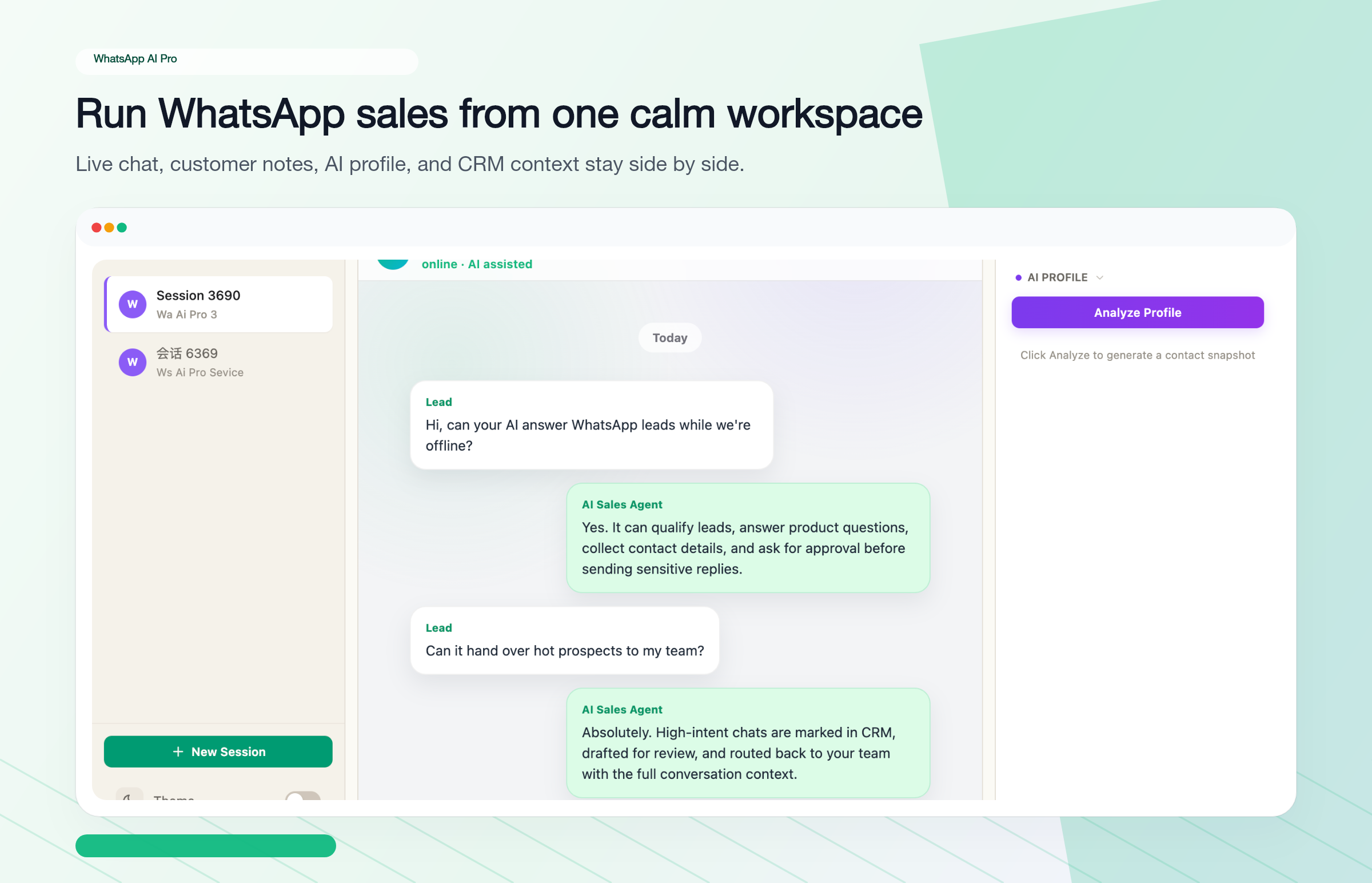
Where it differs from Respond.io and WATI
No WhatsApp Business API. You connect by QR code, the way WhatsApp Web does. No Meta business verification, no BSP onboarding, no template message infrastructure to manage. You send and receive as your existing WhatsApp number.
Local data storage. All conversations and customer data process on your own machine. For businesses under GDPR, PDPA, LGPD — or anyone who simply doesn't want customer data on a vendor's cloud — that's the difference between "compliance is hard" and "compliance is structural."
Knowledge-base AI, not templates. You upload your product catalog, pricing sheets, FAQs. The agent answers based on those documents in free-form natural language, not via decision trees. Run it in draft mode (you approve each reply) and switch to full auto once you trust it.
Flat pricing. $49/month, or $499/year. No per-active-contact, per-agent, per-message, or Meta-markup line items. The bill is the bill.
Setup time. Download, scan QR code, upload your docs. Around 15 minutes to your first AI reply.
What it doesn't do
This isn't a Respond.io or WATI replacement for every use case. The honest tradeoffs:
- No green-tick verification. Your number runs as a regular WhatsApp account, not an official business profile. If trust signals from a verified badge matter to your buyers, this is a gap.
- No template broadcast infrastructure. You can't blast 50,000 marketing templates to opted-in lists with Meta's official rate-limit infrastructure. WhatsApp AI Pro is for handling inbound and warm outbound, not cold campaigns.
- Desktop app. When your computer is off, the agents are off. (You can leave a Mac mini or VM running 24/7, but it's not Respond.io's "always-on cloud" model out of the box.)
For teams that genuinely need API broadcasts or green-tick, you can run WhatsApp AI Pro alongside WATI — one for daily AI conversations, the other for official campaigns. They don't conflict.
Final Decision Matrix
| If you... | Pick |
|---|---|
| Run high-volume WhatsApp campaigns, need green-tick | WATI |
| Manage WhatsApp + Instagram + email + more in one inbox | Respond.io |
| Want autonomous AI with voice + CRM, larger team | Respond.io Growth+ |
| Want AI on your existing WhatsApp number, no API setup | WhatsApp AI Pro |
| Need GDPR/PDPA-friendly local data storage | WhatsApp AI Pro |
| Solo founder or 1-3 person team, WhatsApp-only | WhatsApp AI Pro or WATI Growth |
| Cross-border, multilingual auto-reply needed | WhatsApp AI Pro (90+ languages) |
| Already on WhatsApp Business API and happy | Stay where you are |
Want to see how WhatsApp AI Pro performs on your real conversations? Download the app, scan the QR code in 2 minutes, and try it on a real conversation in draft mode. $49/month flat, 7-day money-back guarantee.
Common Questions About Respond.io vs WATI
Is WATI cheaper than Respond.io?
On the headline platform fee, yes — WATI Growth is $39/month annual vs Respond.io Starter $79/month annual. But WATI adds approximately a 20% markup on Meta's per-conversation message fees and charges $24-59/month per extra user above the included 5. At low message volume the gap holds; at higher broadcast volumes it can close or invert depending on your message mix.
What is the difference between Respond.io and WATI?
Respond.io is omnichannel by design — WhatsApp is one of seven or eight channels it ingests into a single inbox. WATI is WhatsApp-first; it's added Instagram, Facebook, and a web widget but the depth and tooling are still oriented around WhatsApp Business API workflows like template broadcasts and CTWA tracking. If WhatsApp is 80%+ of your inbound, WATI's tooling fits more cleanly. If it's one of several, Respond.io is built for that shape.
Can I use Respond.io or WATI without the WhatsApp Business API?
For other channels (Instagram, email, web chat) — yes. For WhatsApp itself — no. Both are built on the WhatsApp Business API, so the WhatsApp side requires Meta business verification and BSP onboarding. WhatsApp AI Pro is the only alternative covered here that connects via QR code with no API setup at all.
Does Respond.io have a real AI agent or just an assistant?
As of 2026, Respond.io's AI Agent is autonomous — it holds multi-turn conversations, takes voice calls, qualifies leads, updates CRM records, and uses RAG against your knowledge base. Older comparisons that describe it as "AI assist for human agents" are out of date. AI Agent features unlock at the Growth tier ($159/month annual).
Which platform is easiest to set up without a developer?
WhatsApp AI Pro — download, scan QR code, upload documents, around 15 minutes. WATI is next — they handle the BSP onboarding for you, typically a few business days. Respond.io is the most self-serve on API setup; expect days to weeks if you're starting from scratch.
What's the best WATI alternative for AI auto-replies?
If you specifically want autonomous AI handling free-form customer questions on your existing WhatsApp number, WhatsApp AI Pro is the closest fit — connect via QR code in 15 minutes, upload your product docs and FAQs, let role-based AI agents handle the conversation. For a fuller comparison see The 7 Best WATI Alternatives in 2026.
Is the 20% WATI markup on Meta fees real?
Independent reviews (Chatarmin, Flowcart, others) report that WATI applies approximately a 20% markup on Meta's per-conversation rates — for example, ~$0.0119 per Indian marketing message vs Meta's ~$0.0099. WATI's pricing page references "additional charges apply for messages" but doesn't publish the markup explicitly. Model your bill carefully if message volume is high.
Related guides: