
ManyChat for WhatsApp vs WhatsApp AI Pro (2026): Flows or Real AI?
Compare ManyChat WhatsApp automation with WhatsApp AI Pro: Business API setup, marketing flows, AI customer service, pricing, languages, and existing-number support.
The Quick Verdict
If you are evaluating ManyChat for WhatsApp, start by separating marketing automation from customer service. ManyChat and WhatsApp AI Pro barely compete with each other — and that's the most useful thing you can learn from this comparison.
- Pick ManyChat if your business lives on Instagram and Facebook. Comment automation ("comment WORD to get the link"), story-mention triggers, giveaway funnels, drip broadcasts to opted-in lists — ManyChat is the category leader for that, and nothing in this article changes it.
- Pick WhatsApp AI Pro if customers message you on WhatsApp with real questions — prices, shipping, product specs, order status — and you need those conversations answered well, in the customer's language, without hiring a night shift. That's customer service, and it's the exact place where ManyChat's flow-builder model breaks down.
The short version of why: ManyChat conversations are buttons and menus. The WhatsApp AI chatbot in WhatsApp AI Pro produces free-form replies grounded in your product documents. A marketing funnel can survive on buttons. Customer service can't.
All pricing verified as of July 2026. Both vendors update plans frequently — check their sites before deciding.
At a Glance
| ManyChat | WhatsApp AI Pro | |
|---|---|---|
| Built for | Instagram/Facebook marketing automation | WhatsApp customer service & sales conversations |
| WhatsApp connection | WhatsApp Business API — new dedicated number, Meta business verification, template approval | QR code on your existing WhatsApp number, like WhatsApp Web |
| Setup time | Days (verification + template review) | ~15 minutes |
| Conversation style | Flows: buttons, menus, keyword triggers | Free-form natural language, multi-turn context |
| AI capability | "AI Step" add-on (~$29/mo): one AI response inside a flow, no document training, no cross-message context | Knowledge-base AI agents: upload catalogs, price sheets, FAQs; AI answers from them |
| Languages | Flows are single-language unless you build one per language | Real-time translation across 90+ languages, built in |
| Human takeover | Live chat view in ManyChat inbox | Three AI modes (Auto / Suggest / Watch), remote approval from your phone in Telegram, Slack or WeCom |
| Where chat history is stored | ManyChat cloud | Your own computer (local storage) |
| Pricing model | Free / $14 / $29 / $69 per month by active contacts + AI add-on ~$29/mo + Meta per-message fees + contact overage | Flat $49/mo or $499/yr, unlimited messages |
| Free trial | Free tier (25 contacts, no WhatsApp) | 14-day free trial, no credit card |
| Best at | IG comment funnels, broadcasts, giveaways | Inbound inquiries, quoting, follow-up, multilingual support |
What ManyChat Actually Is
ManyChat is an Instagram and Facebook Messenger marketing tool first. WhatsApp is its third channel, unlocked on the Pro plan.
The pricing structure (annual billing, checked July 2026): Free (25 active contacts, no WhatsApp), Essential $14/mo (250 contacts, still no WhatsApp — it's Instagram/TikTok/Messenger/Telegram only), Pro $29/mo (2,500 contacts, the first tier that adds WhatsApp), Business $69/mo (7,500 contacts), Advanced $139/mo (25,000 contacts). Monthly billing runs higher: $17 / $39 / $99 / $199.
Overage is charged per active contact over your limit, and the rate depends on your tier — on Pro it's $0.038 annual ($0.05 monthly), on Business $0.018 annual ($0.025 monthly). Manychat's pricing page now shows AI included in Pro and above, though its AI product page still describes AI as a separate ~$29/mo add-on; check which applies at checkout.
The WhatsApp requirement that surprises people: ManyChat connects through the WhatsApp Business API — not the WhatsApp app on your phone. That means a phone number not already registered on WhatsApp, a Meta Business account, Facebook business verification, and pre-approved message templates (24–48h review per template) for any outbound message outside the 24-hour service window. Your existing WhatsApp number, with its years of customer chats, cannot be connected.
On top of subscription fees, Meta bills per conversation: roughly $0.025 per marketing conversation (US rates), $0.004 per utility conversation, with the first 1,000 service conversations free each month. Independent 2026 reviews put real-world ManyChat spend at $100/month for a lean setup to well over $1,000/month for a business running WhatsApp, SMS, and AI at scale.
Where ManyChat genuinely shines: Instagram. Comment-to-DM automation, story mention replies, click-to-message ad funnels, and broadcast sequences are polished, battle-tested, and backed by a huge template ecosystem. If that's your growth engine, ManyChat earns its subscription.
The Customer Service Test
Here's a message every exporter, retailer, and service business has received:
"Hi, do you have the 40W model in stock? What's the price for 500 units delivered to Hamburg, and how long is shipping?"
Watch what each tool does with it.
How ManyChat handles it
A ManyChat flow is a decision tree. Unless you predicted this exact question and built a branch for it, the customer gets the fallback menu: "Please choose: 1️⃣ Products 2️⃣ Pricing 3️⃣ Shipping." Three questions in one message means three trips through the menu — or more likely, the customer just waits for a human.
The AI Step add-on doesn't rescue this. Multiple independent 2026 reviews reach the same conclusion: ManyChat's AI is closer to keyword matching with pre-scripted responses than conversational AI. You can't train it on your product catalog or price sheets. It generates one response, then drops the customer back into buttons and branches. It doesn't carry context from earlier in the conversation — so when the customer follows up with "and what about 1,000 units?", the AI has no idea what "units" refers to.
That's not a bug. ManyChat was designed to move leads through predefined funnels, and it does that well. It was never designed to answer open-ended questions.
How WhatsApp AI Pro handles it
You've uploaded your product catalog, tiered price list, and shipping policy to the knowledge base. The AI agent reads the message, finds the 40W model, applies the 500-unit tier price, pulls your standard Hamburg lead time, and writes one complete reply — in German, if that's what the customer wrote in.
When the customer follows up with "and for 1,000 units?", the agent knows exactly what's being discussed, because it holds the conversation context the way a human rep would.
This is the core difference: ManyChat asks the customer to navigate your menu. WhatsApp AI Pro answers the customer's question.
The Customer Service Capabilities in Detail
Since customer service is where these tools diverge most, here's what WhatsApp AI Pro ships for it specifically.
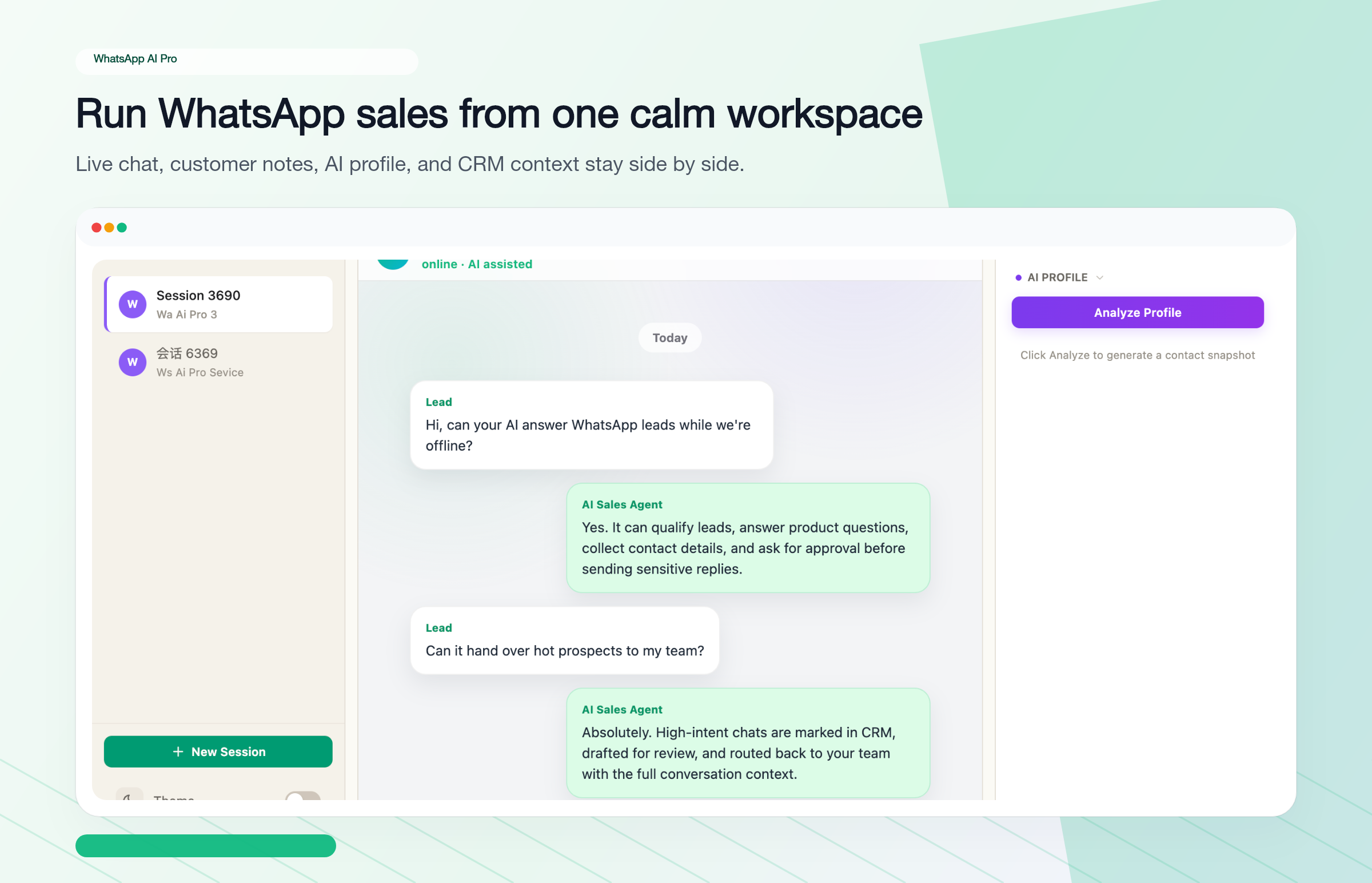
Knowledge-base answers, not scripts. Upload product catalogs, price sheets, FAQs, and policies. Agents answer from those documents in free-form language. Update the document and every future answer updates with it — no rebuilding flows.
Answers from your own spreadsheet. The AI can look up your own spreadsheet for stock or order status; replies quoting a price or delivery time from it wait for your approval (tutorial).
Three AI modes, trust earned gradually. Nobody should hand their customer conversations to an AI on day one. The global AI Mode switch has three settings: Suggest (the AI drafts every reply, you approve or edit before it sends — use this for your first week), Auto (the AI sends replies itself, with a persistent AUTO MODE banner on screen so you always know it's live), and Watch (you write the replies while the AI reads conversations and builds customer profiles; it never sends a reply on its own). Once you've watched it get your business right for a week, switch to Auto.
Multilingual by default. Real-time translation across 90+ languages runs on every conversation — you read and write in your language, the customer reads and writes in theirs. In ManyChat, multilingual support means building and maintaining a separate flow per language.
Follow-up that doesn't depend on memory. The built-in CRM tracks who asked for a quote and went quiet, and the AI drafts the follow-up nudge. In a marketing tool, follow-up means another broadcast; here it's a 1:1 message that references what the customer actually asked about.
Your phone as the control room. With auto-forward, AI drafts arrive in Telegram, Slack or WeCom on your phone, where you can review, approve or rewrite them, or reply to the customer yourself — evenings, weekends, trade fairs. The desktop app does the work; you supervise from anywhere.
Team mode. Multiple teammates can claim and answer conversations on one WhatsApp number, with the AI handling first response and routine traffic. See how Team mode works.
Local storage. Conversations and customer data are stored on your own machine. AI features send content through our servers to an AI provider; drafting a reply, for example, sends recent conversation history, a conversation summary, the contact's name, your notes, CRM details and your company profile. Local storage alone does not make GDPR/PDPA compliance automatic.
Pricing: Flat vs. Stacked
ManyChat's headline price is $29/month. The realistic WhatsApp + AI configuration looks like this:
| Cost item | ManyChat | WhatsApp AI Pro |
|---|---|---|
| Base plan with WhatsApp | Pro $29/mo (2,500 contacts) | $49/mo flat |
| AI features | +~$29/mo add-on | Included |
| Meta per-conversation fees | +$0.004–$0.025 per conversation | None — no Business API |
| Contact overage | +$0.018–$0.025 per contact past limit | No contact limits |
| Template message costs | Required for outbound past 24h window | Not applicable |
| Realistic monthly total | $60 – several hundred dollars, variable | $49, fixed (or $499/yr) |
The number that matters isn't the difference at the low end — it's the variance. ManyChat's bill moves with contact count, message volume, and Meta's regional rates. WhatsApp AI Pro's bill is the same every month regardless of how busy you get. There's also a 14-day free trial with no credit card, and a 7-day money-back guarantee after purchase.
If you want to model the API route with your own message volume, region, and team size, use the free WhatsApp Business API pricing calculator.
What ManyChat Does Better — Honestly
A comparison that pretends the other tool has no strengths isn't worth your time. ManyChat wins clearly at:
- Instagram and Facebook. WhatsApp AI Pro doesn't touch these channels at all. If IG comment funnels drive your revenue, you need ManyChat or something like it.
- Mass broadcasts to opted-in lists. Official API infrastructure, Meta-approved templates, proper opt-in management. WhatsApp AI Pro is built for conversations, not cold blasts — and running bulk campaigns off a regular number is a fast way to get it flagged.
- Structured data collection. Application forms, registrations, field-by-field lead capture — "please enter your name, email, and budget" — is exactly what a flow-builder exists for, and ManyChat does it well. WhatsApp AI Pro deliberately doesn't build forms: free-form conversation is the whole point of an LLM, and marching customers through fixed fields would throw away the thing it's good at. If the job is collecting submissions into structured fields, use ManyChat (or a plain form link) for that piece.
- Green-tick official presence. The Business API route can carry Meta's verified business badge. A QR-connected regular number can't.
- Always-on cloud. ManyChat runs on their servers 24/7. WhatsApp AI Pro is a desktop app — when your computer is off, the AI is off (many users leave a Mac mini or a VM running to cover this, but it's your machine to keep on).
One caveat worth stating plainly: WhatsApp AI Pro automates a regular WhatsApp account through the desktop, which is not an official Meta API product. Used the way it's designed — answering genuine inbound conversations, not spamming — the risk profile is very different from bulk-sender tools, but it's a trade-off you should understand rather than discover. The flip side: ManyChat requires you to abandon your existing number entirely, which for most small exporters is the bigger dealbreaker.
So Which One Should You Pick?
| Your situation | Pick |
|---|---|
| Instagram/Facebook is your main channel; you run comment funnels and giveaways | ManyChat |
| Customers message your existing WhatsApp number with real questions | WhatsApp AI Pro |
| You need mass template broadcasts to opted-in marketing lists | ManyChat (or another BSP like WATI) |
| You need to collect applications or registrations field-by-field (structured forms) | ManyChat |
| You sell across languages and time zones | WhatsApp AI Pro (90+ language translation, AI covers the night shift) |
| You want a predictable flat bill | WhatsApp AI Pro |
| You need Meta's green-tick verified badge | ManyChat / any Business API route |
| Your bottleneck is answering the same product questions 50 times a day | WhatsApp AI Pro |
| You run both marketing funnels and WhatsApp service | Both — they don't conflict; ManyChat on IG, WhatsApp AI Pro on your WhatsApp number |
Want to see what AI customer service looks like on your own conversations? Download WhatsApp AI Pro, scan the QR code, and run it in draft mode on real inquiries — the AI writes, you approve. 14-day free trial, no credit card.
Common Questions
Can ManyChat reply to WhatsApp messages with AI?
Partially. ManyChat's AI Step (a paid add-on around $29/month) can insert one AI-generated response inside a flow, but 2026 reviews consistently describe it as closer to keyword matching than conversational AI: it can't be trained on your documents, doesn't hold context across messages, and hands the customer back to buttons after responding. For open-ended customer service questions, it falls back to menus.
Does ManyChat work with my existing WhatsApp number?
No. ManyChat requires the WhatsApp Business API, which needs a phone number not already registered on WhatsApp, plus Meta business verification and template approval. Your existing number and chat history can't come along. WhatsApp AI Pro connects to your existing number via QR code, the same way WhatsApp Web does.
What does ManyChat really cost for WhatsApp with AI?
The floor is about $58/month (Pro $29 + AI add-on ~$29) before Meta's per-conversation fees and contact overage. Independent 2026 pricing breakdowns put typical real-world spend between $100 and $1,000+/month depending on volume. WhatsApp AI Pro is $49/month flat with no per-message or per-contact fees.
Is ManyChat or WhatsApp AI Pro better for customer support?
For support specifically — answering product, pricing, shipping, and order questions — WhatsApp AI Pro, and it's not close. Its AI answers free-form from your uploaded documents in the customer's language, with draft-mode review and remote approval from your phone. ManyChat's flow model was designed for marketing funnels; support requests that don't match a prebuilt branch land in a menu or a human queue.
Can WhatsApp AI Pro collect applications or run form-style flows?
No — by design. WhatsApp AI Pro doesn't do forms, surveys, or field-by-field data capture. Structured intake is a flow-builder job, and ManyChat is genuinely good at it. What WhatsApp AI Pro does instead is answer applicants' free-form questions from your documents and track in its CRM what each contact asked about. If your process needs both — say, answering FAQ about a program and collecting formal applications — let the AI handle the conversations and use ManyChat or a simple form link for the structured part.
Can I use ManyChat and WhatsApp AI Pro together?
Yes, and for businesses that need both marketing and service it's a sensible split: ManyChat runs your Instagram/Facebook funnels and opt-in broadcasts, while WhatsApp AI Pro handles the 1:1 conversations on your existing WhatsApp number. They operate on different channels and different numbers, so they don't conflict.
Related guides: