
WhatsApp AI Assistant: One Brain for Your Customer Journey
Meet WhatsApp AI Pro: one AI-driven workspace that answers customers, remembers their needs, tracks promises, follows up and learns, with you in control.
One AI brain. The whole customer journey. An assistant that keeps evolving with you.
WhatsApp AI Pro brings AI replies, customer memory, sales follow-ups, reminders and learning into one connected workspace. It is built to take on the work surrounding a customer relationship: understand the inquiry, prepare the answer, remember what matters and keep the next step moving.
Our ambition is to build the most advanced WhatsApp AI assistant, with the best everyday experience for the people who depend on WhatsApp for business. That means pursuing useful intelligence, actively improving the product and iterating quickly on how the work gets done. The measure is practical: less repeating yourself, less searching through chats, and more confidence that the right customer gets the right attention.
AI drives the workflow from the first message
A customer message can contain several jobs at once: a product question to answer, a delivery concern to remember, a sales opportunity to track and a commitment to follow through on. WhatsApp AI Pro is designed around that whole chain.
Understand → answer → remember → track → follow up → learn.
The AI uses your business facts to prepare the answer. Customer context gives the next reply continuity. CRM tracking makes the relationship visible. Reminders bring unfinished work back to your attention. Your corrections help shape future behavior.
That connected experience is the heart of this product. You should feel that your assistant understands the business you are running and stays involved as the conversation develops.
| Part of the journey | What your AI assistant does |
|---|---|
| A new inquiry arrives | Understands the question and prepares a reply using company knowledge |
| The buyer explains their needs | Builds customer context: products, concerns, intent and deal stage |
| You promise a next step | Tracks detected commitments and surfaces them when due |
| A conversation goes quiet | Prepares contextual follow-ups under your chosen controls |
| A decision needs you | Brings the conversation and its context to a human |
| You correct the work | Applies evidence-backed improvements from your feedback, each one visible and revocable |
One AI brain you can teach naturally
In the desktop 2.1 interface, AI Nexus gives you one conversation for company knowledge and lasting reply preferences. Explain how your business works, upload your material, or tell it what has changed:
“Our minimum order is now 30 packs. Ask for quantity before giving a bulk quote. Keep the reply short and clear.”
Nexus can update supported company facts and preferences as it works. Read its response and inspect the saved information to confirm the result. You can also adjust a pending reply through a small conversation directly inside the draft.
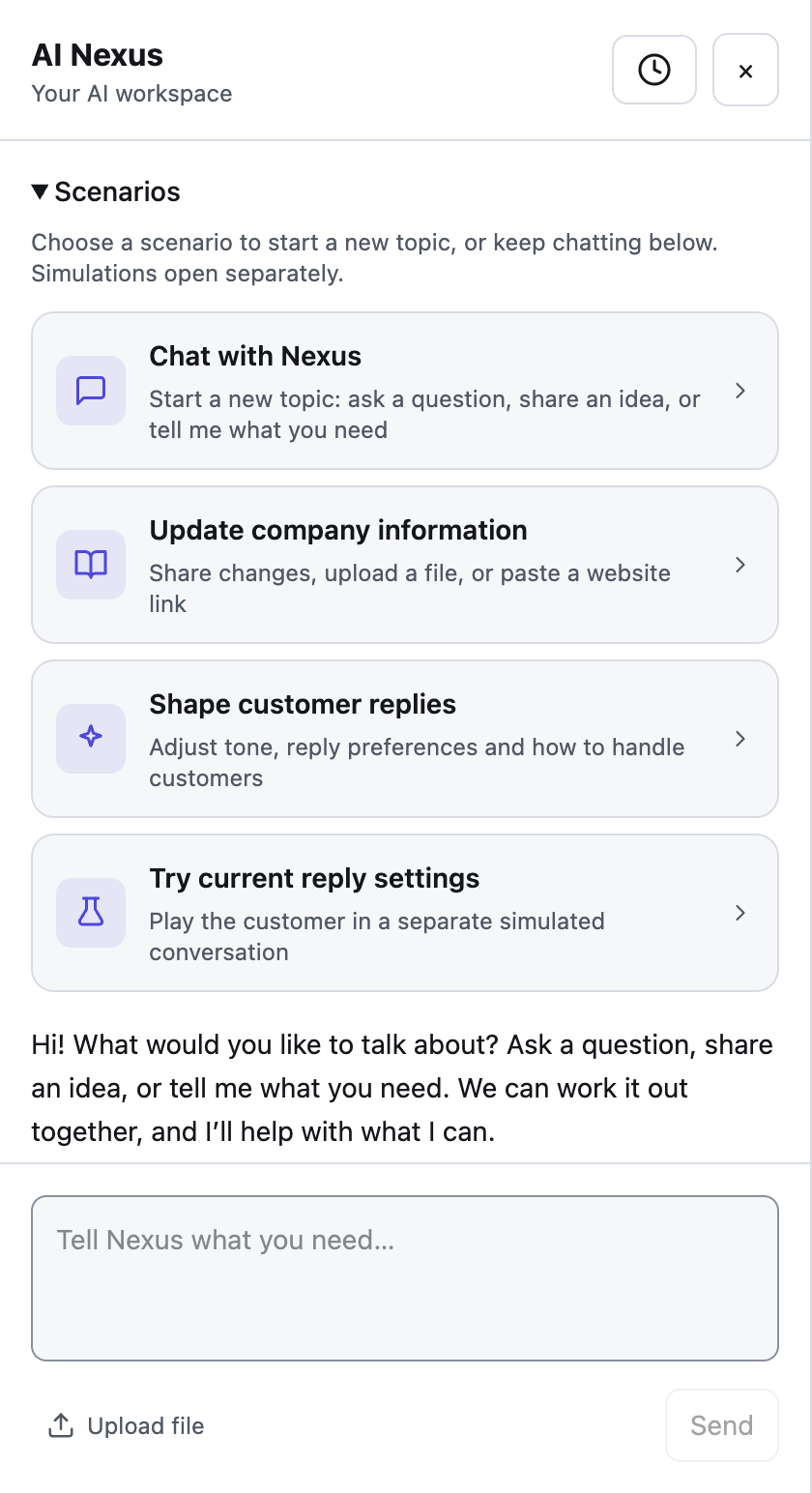
The experience is designed to make teaching your assistant part of the workday. You can explain a correction when you notice it and keep moving.
Customer records, commitments and learning history remain visible in their own screens. One brain means connected intelligence with inspectable work. You can see what your assistant knows, what it is preparing and what it learned. See the Nexus guide for the interface details.
AI replies that know your business
Teach the assistant your products, prices and policies. It can then prepare specific answers to the questions customers actually ask, in their language, while you choose how replies are sent.
For a product inquiry, it can use the catalog and ask about missing quantity or delivery details. For stock or order status, it can look up your own spreadsheet; replies quoting a price or delivery time from it wait for your approval. For a missing business fact, a clarification can bring the question back to you.
Start with a real question and compare the draft against your information. Our AI reply tutorial walks through that process. The guide to WhatsApp auto reply on a personal account covers repeated questions and after-hours assistance.
AI CRM that remembers the relationship
Every returning customer should feel like a continuing conversation. WhatsApp AI Pro builds customer records from chats so your team can see needs, concerns, buying signals, deal stage and promises together.
Today's Plan, your daily briefing, brings attention back to the people who need it. The pipeline board keeps active conversations organized. The promises ledger helps a commitment made in chat become something you can act on.
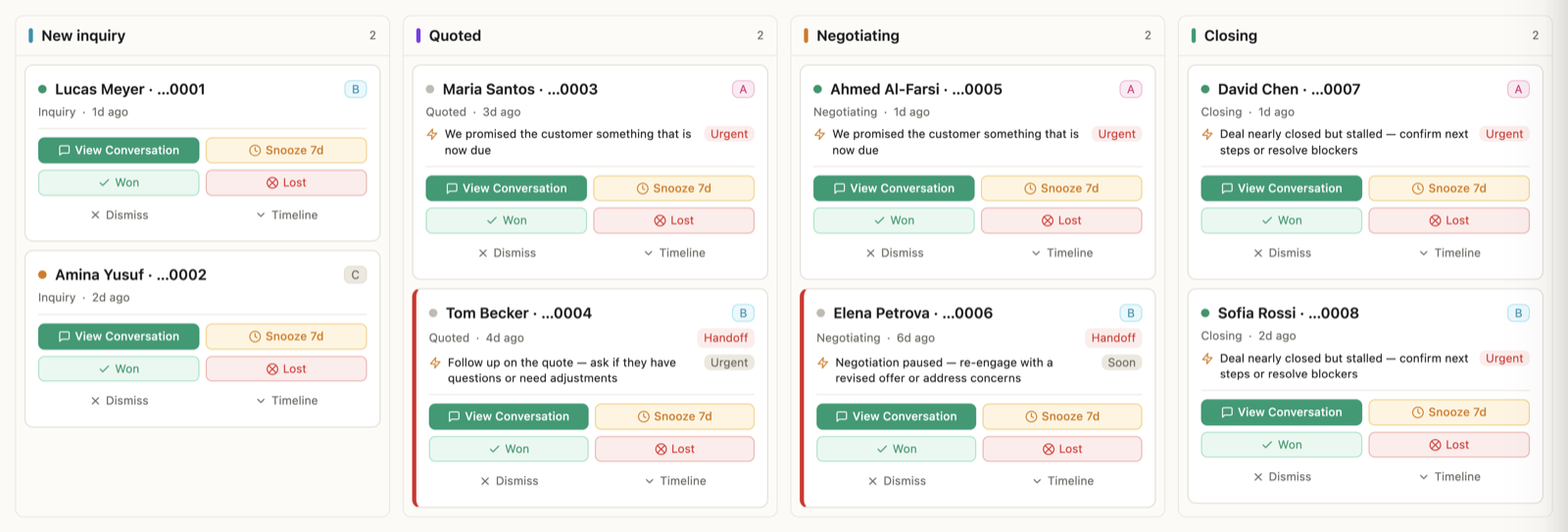
You review and correct the AI's interpretation. A lead score helps prioritize attention; the conversation provides the evidence. See the AI CRM workflow for the daily routine.
Choosing a CRM? See how WhatsApp AI CRM reduces manual customer tracking, with an inquiry-to-follow-up example.
Keep the whole relationship moving
The first answer should make the next step easier. Customer memory gives a returning conversation continuity. A tracked commitment brings unfinished work back into view. A follow-up can address the buyer's last concern, and your correction can inform a better future reply.
That is the full-workflow experience: the AI keeps the thread of the relationship while your team makes the decisions that move it forward. Our sales walkthrough follows a buyer from product inquiry to quotation, commitment and follow-up, with the human handoff points shown at each step.
Proactive intelligence, thoughtful takeover
The best AI experience gives you meaningful control over each kind of work. WhatsApp AI Pro lets you choose how much to delegate:
- Suggest: AI prepares replies and routine follow-ups for your approval.
- Auto: AI can handle permitted routine replies and follow-ups within the configured controls.
- Watch: you write the messages while CRM and translation assist in the background.
- Team: AI prepares drafts for human reps through Telegram or the Enterprise Inbox.
Some actions keep their own review requirements. Promise follow-ups always wait for approval. Negotiations, complaints and exceptions should follow your configured human handoff rules. Reminding you to ship a sample does not complete the shipment; a person confirms that work.
A separately started win-back campaign uses a different workflow: messages are generated at send time without individual preview, with pause and cancel controls. The mode guide and campaign guide explain those choices.
Proactive where it can help. Careful where your judgment matters. That balance is central to the assistant we are building.
An AI that learns, and a product built to evolve
Your business changes. Your assistant should be able to change with it.
Teach new facts immediately. Update company information when a product, price or policy changes, then inspect what was saved. Future work should start from the information your business stands behind.
Shape how it works. Tell Nexus your lasting reply preferences. Explain how you want to answer a bulk inquiry or what tone fits your customers. Make the change explicit and check the result.
Turn corrections into learning. Edits, rejected drafts and rewrite instructions supply feedback. Learning History shows the patterns it finds, with their evidence. Improvements the evidence clearly supports apply automatically, and each one can be revoked. Follow-up pacing has a narrow automatic adjustment: it can only become less frequent, with the change visible and reversible.
This is practical adaptation through facts, preferences and feedback you can inspect and reverse. You can inspect the improvements in the work you receive and shape how your assistant develops. The learning tutorial shows the controls.
Our product direction follows the same principle: active evolution and fast iteration toward a more capable, easier-to-use AI workspace. The desktop 2.1 Nexus interface makes company updates and reply preferences conversational and puts draft adjustments inside the reply itself. The download page identifies the available release; the guides show how to use the capabilities described here.
Built for businesses that grow through conversations
This workflow fits teams whose sales require discussion: products, quantities, quotations, delivery and follow-through. Wholesale, export and service businesses can bring those jobs together on an existing WhatsApp number, with translation and voice support helping across languages and message formats.
WhatsApp AI Pro runs as a desktop app connected by QR code without the Business API. Keep the computer and connection available for ongoing automation. The desktop stores data locally; AI requests send relevant conversation and business context to our backend and the AI service used for the request. Shared web features and integrations have additional data flows described in our security information.
Frequently Asked Questions
What is a WhatsApp AI assistant?
A WhatsApp AI assistant helps handle customer conversations and the work around them. WhatsApp AI Pro connects business-grounded replies, customer memory, CRM tracking, reminders, follow-ups and learning in one workspace, with human controls for different actions.
Can one AI handle replies, CRM and follow-ups together?
WhatsApp AI Pro connects those jobs around business knowledge and customer context. Replies help develop the conversation, CRM keeps the relationship visible, and the daily plan brings the next action back to your attention. You can inspect and correct the records.
How does the AI learn my business?
You provide company facts and lasting reply preferences through Nexus. Edits and rejections can also produce evidence-backed improvements, which apply automatically when the evidence supports them. Each one can be revoked, and learning does not grant new sending permissions.
Can I keep approving messages while using the AI CRM?
Yes. Solo Suggest keeps replies and routine follow-ups as drafts while CRM supports customer tracking. Promise follow-ups require approval. Team mode also puts human reps in charge of sending replies.
How can I experience the full workflow?
Add your business facts, review a product-question draft, inspect the customer record and check the next action. Continue in Suggest mode while feedback accumulates, then review Learning History and decide which routine work to delegate.
Build a WhatsApp business that remembers every conversation's next step. Download WhatsApp AI Pro and start with your first AI reply.