
WhatsApp AI CRM: Customer Tracking With Less Manual Work
Keep track of WhatsApp customers, quotes and follow-ups with AI. Discover a connected CRM that remembers conversations and helps you plan the next step.
Your next sale may be buried in yesterday's WhatsApp chats. One buyer is waiting for delivery details, another asked for a quote, and a third said to get back in touch next week. Keeping those relationships moving takes more than answering the newest message.
WhatsApp AI Pro brings customer tracking, AI replies, reminders and follow-ups into one connected workspace. Its WhatsApp AI CRM builds customer context from conversations and helps you see what needs attention. The goal is simple: less copying information, less reconstructing chat history, and a clearer next step for each customer.
What is a WhatsApp CRM, and what does AI add?
A WhatsApp CRM organizes customer relationships around your conversations: who the customer is, what they need, where the deal stands and what should happen next. When choosing one, distinguish contact storage and shared messaging from the work of interpreting and maintaining those records.
In WhatsApp AI Pro, AI extracts customer needs and buying signals from available chats, tracks deal stages and detects commitments. You review uncertain interpretations and correct them. The benefit is reducing repetitive record keeping while keeping the customer story useful for the next reply.
From a quotation to the next conversation
Consider an illustrative wholesale inquiry, not a measured customer case study:
| What happens in the chat | How the AI CRM helps | Your decision |
|---|---|---|
| A buyer asks for 200 filters | Captures the product and quantity as customer context | Check the details |
| You send a quote; the buyer asks about shipping | Keeps the quoted deal and delivery concern visible | Confirm the actual delivery terms |
| You say, “I'll confirm the shipping cost Friday” | Detects a promise and surfaces it when due | Complete the work and review the follow-up draft |
| The buyer goes quiet | Can prepare a contextual routine follow-up | Check timing and the offer under your selected sending mode |
A useful follow-up remembers the buyer's concern. It should not invent a discount or say a shipment is complete because a reminder came due.
One AI brain: remember, answer, follow up and improve
Company knowledge explains your business; customer memory explains this relationship. Product facts and policies inform an answer, while the buyer's needs and previous conversations give it context. The CRM, AI replies and follow-up workflow connect these pieces inside WhatsApp AI Pro.
Your corrections can also produce evidence-backed learning improvements. Changes the evidence clearly supports apply automatically, and each one can be revoked. Learning improves the guidance available to the assistant, without granting new sending permissions. This is part of our full-workflow WhatsApp AI assistant.
Easy to use: explain your business and review the priorities
Teach AI Nexus through conversation: upload business material, explain product facts and state lasting reply preferences. For example, “Ask for quantity before preparing a wholesale quote.” Read its reply to confirm what was saved. You can also adjust a pending reply by talking directly inside its draft view. For company facts, also inspect the saved fields in Business Intelligence; check the Nexus response for which reply preferences were applied.
Customer tracking builds from conversations as they happen. You do not have to design a custom automation flow to start this CRM routine. Open Today's Plan to review customers needing attention, check detected promises and inspect the pipeline board. Correct a stage, defer a follow-up or mark an outcome as needed.
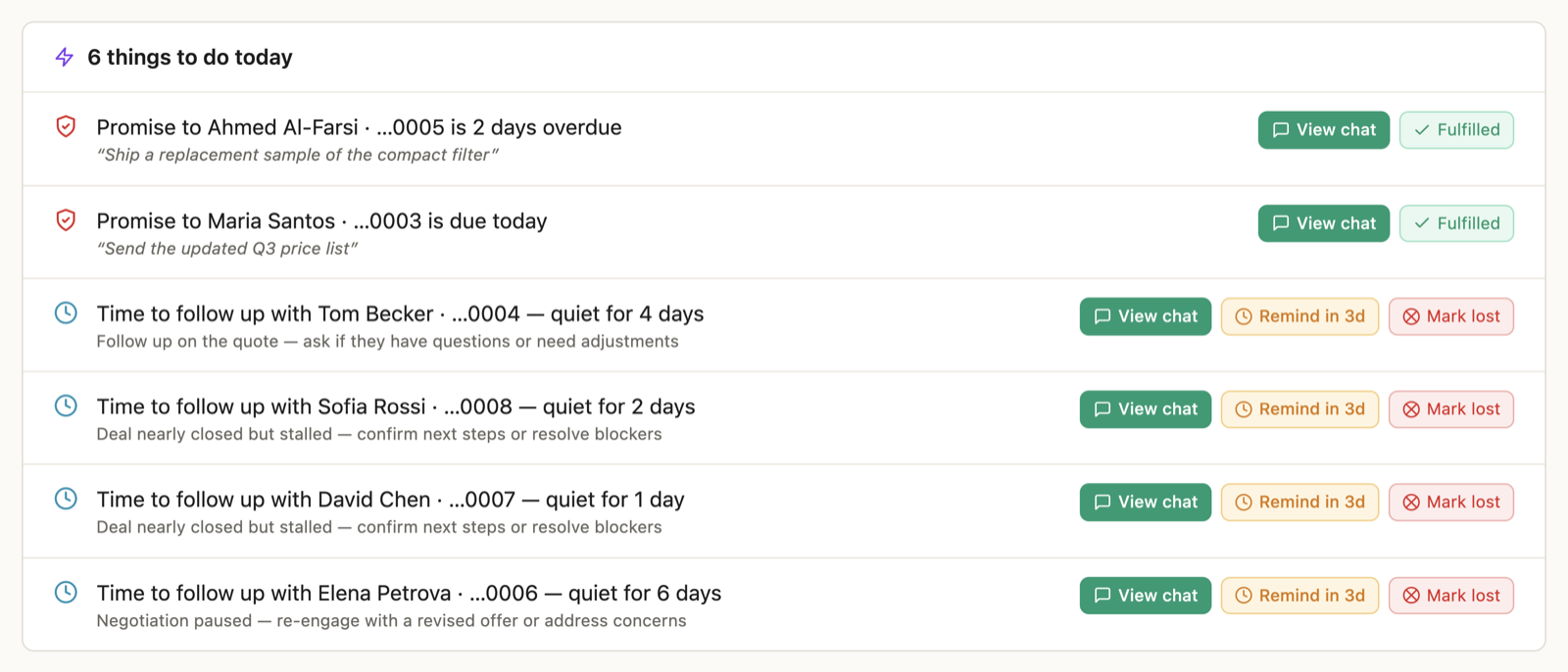
The CRM walkthrough explains the screens and controls; the Nexus guide shows conversational setup.
Who is this CRM for?
It is a good fit to evaluate when you sell through ongoing WhatsApp conversations: wholesale inquiries, export quotations or services that require several exchanges. The clearest reason to try it is that you personally remember every customer's needs and repeatedly search chats to work out the next step.
If you need a particular Zoho or HubSpot integration, accounting records or order execution, verify those requirements separately. Conversation tracking does not establish that an external CRM was updated, payment collected or an order fulfilled.
Choose how much work to hand over
You can use Watch mode to keep CRM tracking active while you write replies yourself. In Solo Suggest, routine follow-ups wait as drafts; Solo Auto can send routine follow-ups within the selected controls. Promise follow-ups always require approval. Replies quoting a price or delivery time from your spreadsheet wait for your approval. Separately started win-back campaigns have different sending controls; see the campaign guide.
WhatsApp AI Pro is a desktop app connected to your existing WhatsApp number by QR code. Keep the computer and connection available for ongoing automation. Local storage does not mean offline AI: relevant conversation and business context is sent to the backend and AI service for AI requests. See security and data handling.
Try it with a customer relationship you already understand
Start with a familiar conversation. Check whether the AI captured the real need, the deal stage and any outstanding promise. Then review Today's Plan and one prepared follow-up. Look for less repeated reading and clearer priorities; count any corrections and reviews as part of the work.
Download WhatsApp AI Pro, check the current plans, and follow the CRM setup walkthrough. For broader tool selection, read our AI agent comparison.
Frequently Asked Questions
When does chat history stop being enough for customer management?
Consider a CRM when you repeatedly reread conversations to find customer needs, open quotes or your next commitment. Evaluate whether organized context and a daily plan make those decisions easier; message volume alone does not decide it.
Can I use the CRM while replying to customers myself?
Yes. Watch mode keeps CRM tracking active while you handle replies. You can evaluate customer memory and priorities before delegating customer messages.
What should I check before choosing a WhatsApp CRM?
Try a familiar customer conversation. Check the captured need, stage, pending work, ease of correction and sending controls. Verify any required integrations separately, and include the time spent reviewing records in your assessment.
Is this a free WhatsApp CRM or a browser extension?
WhatsApp AI Pro is a desktop product. Check the pricing page for current plans and any trial terms; this article does not promise a free ongoing CRM plan. Keep the desktop app and connection available for ongoing automation.