
WhatsApp Team Inbox: One Number, Multiple Agents — No Business API
Run several human reps on one WhatsApp number with Telegram seats. AI drafts every reply; your team reviews and sends. 15-minute setup, no API fees.
The Problem: One Number, Five People Who Need to Answer It
If you run a small trading company or an online store, you know this situation. Your business has ONE WhatsApp number — the one printed on your catalog, the one all your customers already have. But you have three, five, maybe ten customer service reps who need to answer those messages.
The phone with that number sits on someone's desk. Everyone else shouts across the office: "Who's handling the customer from Brazil?" Orders get missed. Two people answer the same customer with different prices. Nobody knows who said what.
Tools like respond.io solve this with a shared team inbox — but they require the WhatsApp Business API, per-seat pricing, and template message approval for every conversation you start.
WhatsApp AI Pro 1.1 solves it differently: Team Mode. Your WhatsApp number stays connected to the desktop app. Your reps work from Telegram — an app they already have on their phones. And unlike a plain team inbox, the AI pre-writes a draft reply for every incoming message, so your reps review and send instead of typing from scratch.
How Team Mode Works
Open AI Nexus → Takeover Settings and you'll see a switch at the top: Solo mode / Team mode.
Solo mode is the classic setup: one operator, with the AI either replying automatically, suggesting drafts for your approval, or just watching.
Team mode flips the entire model:
- Every incoming customer message becomes an AI draft. The AI reads the conversation, checks your product catalog and company facts, and writes a complete reply — instantly, 24/7, in the customer's language.
- Nothing sends automatically. The draft is delivered to your team on Telegram. A human always makes the final call.
- Your reps claim, edit, and send from their phones. No new software to install, no extra WhatsApp accounts, no API fees.
The key insight: the AI does the slow part (reading context, looking up prices, writing in Portuguese at 2am), and humans do the judgment part (is this right? should we offer that discount?).
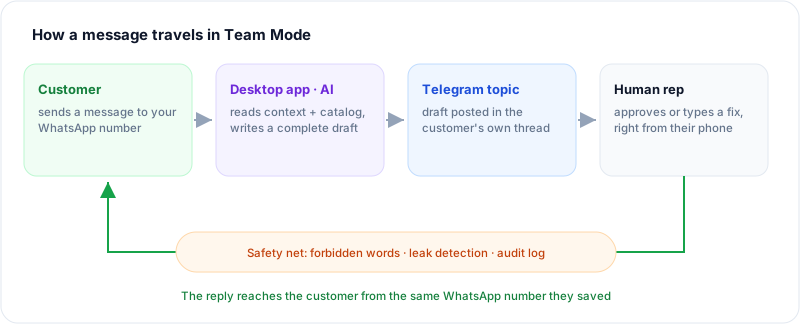
One number in, one number out — the AI drafts in the middle, and a human always makes the final call.
Setup Tutorial (15 Minutes)
Step 1 — Create Your Telegram Bot
- Open Telegram and message @BotFather.
- Send
/newbot, pick a name and a username. - BotFather gives you a bot token — copy it.
In WhatsApp AI Pro: AI Nexus → Takeover Settings → Telegram setup → paste the token, turn on remote notifications, and press Bind Telegram after sending /start to your bot. That binds YOU as the owner seat.
The Telegram setup is shared: even in Solo mode, this same bot pushes approval requests and handoff alerts to your phone.
Step 2 — Switch to Team Mode
Flip the staffing switch to Team mode. From this moment, every inbound message generates a pending draft instead of an auto-reply — the AI never sends on its own in Team mode.
Step 3 — Add Your Rep Seats
In the Rep seats card:
- Type the rep's real name (e.g., "Maria") and click Add seat.
- The app generates a bind link — send it to Maria on any channel.
- Maria taps the link, Telegram opens your bot, she presses Start. Done — bound in one tap.
Seat identity is the rep's Telegram account (unforgeable), and the name you typed is what everyone sees — in claim announcements, the dashboard, and the audit log. You can rename a seat anytime by clicking its name.
Step 4 — Bind a Team Group (Use a Topics Group!)
Create a Telegram group with your reps and enable Topics in the group settings. Then:
- Add your bot to the group and make it an admin with the "Manage Topics" right.
- In the Rep seats card, click Bind group and send the generated link into the group.
Why Topics matter: with a Topics group, every customer gets their own dedicated topic thread. The customer's messages, the AI drafts, and your team's replies all live in one organized thread per customer — instead of one chaotic group feed.
The Daily Workflow: Claiming and Replying
A message arrives. Within seconds, the customer's dedicated topic shows the message plus a complete AI draft with buttons: Approve, Reject — and Claim while nobody owns the conversation. Every seat sees it; in topic mode there are no information walls.
Who is allowed to reply: binding is the only gate
Only bound seats count. If someone in the group hasn't been bound (a colleague added by accident, a supplier), the bot silently ignores anything they type in a topic — it never reaches the customer. Remember: group membership ≠ rep authorization. Only send bind links to actual reps.
Taking a conversation: three paths, none requires claiming first
| You want to… | Do this | Ownership |
|---|---|---|
| Send the draft as-is | Tap Approve | Unchanged — any seat can approve |
| Fix the draft, or write your own | Just type in the topic | Replying IS claiming: you automatically become the owner (never steals an existing claim) |
| Reserve it, reply later | Tap Claim | Topic announces "✅ Claimed by: Maria"; the desktop dashboard mirrors it |
There is no "claim before you may reply" rule — whoever sees it can handle it, speed first. A claim is an ownership marker for the team and the boss, not a permission lock.
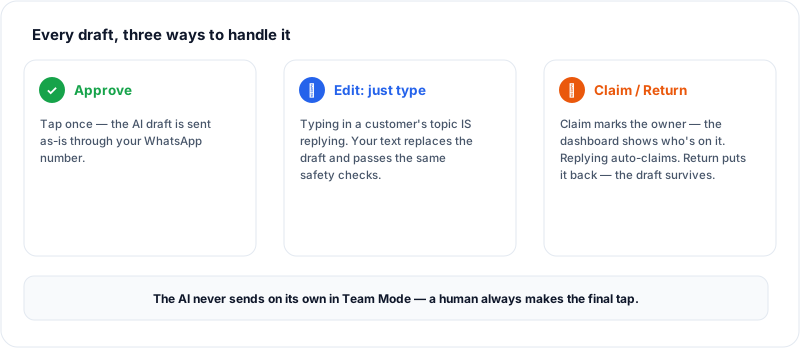
Approve, rewrite by typing, or claim — every path ends with a human decision.
Replying: typing in a topic is sending, with two cases handled automatically
Anything you type in a customer's topic goes to that customer after the safety checks — no commands, no copy-paste. The system distinguishes two cases on its own:
- A pending draft exists → your text is treated as the edited draft: it goes out through the full approval chain, the audit log records "Maria: sent (edited)", and the AI learns from your correction.
- The draft was already handled → your text is a plain human message, relayed directly.
Either way, the topic gets a ✅ "Sent to customer" confirmation everyone can see.
What if two people grab the same conversation? The system backstops it
- Two people tap Approve simultaneously: exactly one succeeds; the other gets an "already processed" notice. The same draft can never send twice.
- After anyone replies, every older pending draft for that customer is voided — nobody can accidentally approve a stale draft from the desktop an hour later.
- Two people type one after another: each is its own human message (like two colleagues both speaking up); both see each other's ✅ confirmations in the topic, so the second person naturally stops.
- Tapping Claim on an owned conversation pops "Already claimed by: Maria" — an internal collision warning.
Claimed the wrong one? Return ≠ Reject
Tap Return. Ownership clears, the conversation goes back to unclaimed, and the pending draft survives untouched for the next person — returning is letting go, not vetoing the reply.
Every message a rep sends passes the same safety net as the AI: forbidden-word list, API-key and system-prompt leak detection, and the full audit trail in the Routing Log.
What About Accountability?
- The Dashboard shows every pending draft with a "Claimed by" chip, so the boss sees workload distribution at a glance.
- Every send is logged with the rep's real name — "Maria: sent the revised quote" — in the activity log.
- Binding notifications go to the owner: when a new seat binds, you immediately see WHO (their Telegram identity) bound it.
Honest Limitations
- Reps reply with text only for now — media replies from Telegram aren't relayed yet.
- The desktop app is the brain: if the computer running WhatsApp AI Pro is off, messages aren't forwarded (they're waiting when it's back).
- One bot token = one workspace. Don't reuse the same bot across two computers — Telegram only allows one consumer per bot.
Coming Next: Inbox Mode (Enterprise)
Telegram is the first team channel — not the last. We're building Inbox mode: a self-hosted shared customer-service workspace (a web inbox your team opens in a browser), with both on-premise and cloud deployment options. It's planned as an Enterprise-edition feature — if your team needs it, talk to us.
FAQ
Can several people answer one WhatsApp number at the same time?
Yes. The number stays connected to WhatsApp AI Pro on one desktop, and any number of reps work the conversations from Telegram — each customer in their own topic thread, with claim tracking so everyone knows who's on what.
Do I need the WhatsApp Business API?
No. Team Mode works with the WhatsApp account you already have, connected by QR code — the same mechanism as WhatsApp Web. No business verification, no message templates, no per-message fees.
Do my reps need their own WhatsApp accounts?
No. Reps only need Telegram. Every reply goes out through the company's single WhatsApp number.
How much does Team Mode cost per seat?
Nothing — Team Mode is included in Pro with unlimited human seats.
Do reps have to claim a conversation before replying?
No. Any bound seat can approve a draft or type a reply directly — replying automatically records them as the owner. Claiming is an "I've got this one" marker that helps the boss see workload distribution, not a precondition. Double-sends are prevented by the system: if two people approve the same draft at once, it goes out exactly once.
Can the AI send a message on its own in Team Mode?
No. In Team Mode the AI only drafts; every outgoing message requires a human tap.
Get Started
Team Mode is included in Pro — with unlimited human seats. No per-seat pricing, ever.